Java Tools Tutorials - Herong's Tutorial Examples - v6.24, by Herong Yang
com.sun.management.jmxremote.port - JMX Agent for Remote Connection
This section provides a tutorial example on how to turn on the out-of-the-box JMX agent on Sun JVM for monitoring tool 'jconsole' to connect from remote machines.
If you want to run 'jconsole' on a remote machine to monitor a Java application, you need to launch the JVM with the default JMX agent turned on using this system property: "com.sun.management.jmxremote.port=<portNum>"
Here is what I did to run my PrimeNumberSeeker.java with the default JMX agent for remote monitoring connections:
1. To run this program with the out-of-the-box JMX agent turned on, I used the following commands:
herong> java -Dcom.sun.management.jmxremote.port=6789 \
   PrimeNumberSeeker

Error: Password file not found: C:\Progra~1\java\jdk-10.0.1\conf
   \managememote.password
jdk.internal.agent.AgentConfigurationError
   at jdk.management.agent/sun.management.jmxremote
      .ConnectorBootstkPasswordFile(ConnectorBootstrap.java:572)
   at jdk.management.agent/sun.management.jmxremote
      .ConnectorBootsttRemoteConnectorServer(ConnectorBootstrap.java:436)
   at jdk.management.agent/jdk.internal.agent.Agent.startAgent(Agen50)
   at jdk.management.agent/jdk.internal.agent.Agent.startAgent(Agen21)
2. I got this error because the remote JMX agent requires a password file to only give permissions to authorized remote connections. For testing purpose, I used this system property: "com.sun.management.jmxremote.authenticate=false" to turn off the authentication function:
herong> java -Dcom.sun.management.jmxremote.port=6789 \
   -Dcom.sun.management.jmxremote.authenticate=false \
   PrimeNumberSeeker

Period, Current int, # primes
1, 2, 0
2, 10, 4
...
3. I tried to run "jconsole localhost:6789" to connect to this JMX agent remotely. But JConsole gives you a warning message: "Secure connection failed. Retry insecurely? - The connection to localhost:6789 could not be made using SSL. Would you like to try without SSL?" as shown below:
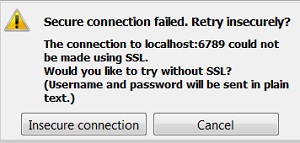
4. We are getting this warning message because the remote JMX agent is asking for a SSL connection by default. For testing purpose, I used this system property: "com.sun.management.jmxremote.ssl=false" to turn off the SSL function:
herong> java -Dcom.sun.management.jmxremote.port=6789 \
   -Dcom.sun.management.jmxremote.authenticate=false \
   -Dcom.sun.management.jmxremote.ssl=false \
   PrimeNumberSeeker

Period, Current int, # primes
1, 2, 0
2, 10, 4
...
Now I am ready run "jconsole" to connect to this JMX agent remotely. See the next section for more tutorial examples.
Table of Contents
javac - The Java Program Compiler
java - The Java Program Launcher
jpackage - Binary Package Builder
javadoc - The Java Document Generator
jdeps - The Java Class Dependency Analyzer
jdeprscan - The Java Deprecated API Scanner
jcmd - The JVM Diagnostic Tool
►jconsole - Java Monitoring and Management Console
JMX Technology and jconsole Tool
jconsole - Command Options and Connection Window
com.sun.management.jmxremote - JMX Agent for Local Connection
jconsole - Connecting to a Local JMX Agent
►com.sun.management.jmxremote.port - JMX Agent for Remote Connection
jconsole - Connecting to a Remote JMX Agent
jstat - JVM Statistics Monitoring Tool
jhsdb - The Java HotSpot Debugger
jvisualvm (Java VisualVM) - JVM Visual Tool
javap - The Java Class File Disassembler
keytool - Public Key Certificate Tool
jrunscript - Script Code Shell
native2ascii - Native-to-ASCII Encoding Converter