Java Tools Tutorials - Herong's Tutorial Examples - v6.24, by Herong Yang
JMX Technology and jconsole Tool
This section describes the JMX API and 'jconsole'. Java application can be monitored with 'jconsole' using out-of-the-box JMX settings when launching the SUN JVM.
"JMX (Java Management Extensions)": A Java standard API for management and monitoring of resources such as applications, devices, services, and the Java virtual machine. The JMX technology was developed through the Java Community Process (JCP) as Java Specification Request (JSR) 3, Java Management Extensions, and JSR 160, JMX Remote API.
JMX has been implemented into JDK since Java 5. You can set out-of-the-box JMX monitoring and management properties when you start the JVM to run your Java application. This allows you to use local or remote JMX connectors to monitor your application.
"jconsole" is a graphical user interface introduced since JDK 1.5 that uses the JMX technology to monitor your Java application locally or remotely. The picture below shows you how "jconsole" works with your Java application:
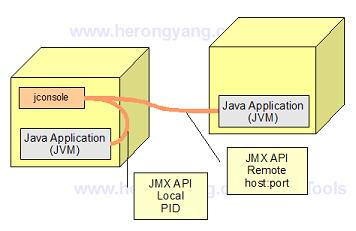
Table of Contents
javac - The Java Program Compiler
java - The Java Program Launcher
jpackage - Binary Package Builder
javadoc - The Java Document Generator
jdeps - The Java Class Dependency Analyzer
jdeprscan - The Java Deprecated API Scanner
jcmd - The JVM Diagnostic Tool
►jconsole - Java Monitoring and Management Console
►JMX Technology and jconsole Tool
jconsole - Command Options and Connection Window
com.sun.management.jmxremote - JMX Agent for Local Connection
jconsole - Connecting to a Local JMX Agent
com.sun.management.jmxremote.port - JMX Agent for Remote Connection
jconsole - Connecting to a Remote JMX Agent
jstat - JVM Statistics Monitoring Tool
jhsdb - The Java HotSpot Debugger
jvisualvm (Java VisualVM) - JVM Visual Tool
javap - The Java Class File Disassembler
keytool - Public Key Certificate Tool
jrunscript - Script Code Shell
native2ascii - Native-to-ASCII Encoding Converter