Java Tools Tutorials - Herong's Tutorial Examples - v6.24, by Herong Yang
jconsole - Command Options and Connection Window
This section describes the 'jconsole' command and its options. The connection window of the JDK 1.6 version is also included.
What Is "jconsole"? - "jconsole" is a graphical user interface tool that enables you to monitor and manage Java applications and virtual machines on a local or remote machine using the JMX technology.
"jconsole" has been included in JDK installation since JDK 1.5. And it is represented by the %java_home%\bin\jconsole.exe program file.
If you have %java_home%\bin directory included in "path" the environment variable, you can run "jconsole -help" to see its "jconsole" command options:
herong> jconsole -help

usage: jconsole [ -interval=n ] [ -notile ] [ -pluginpath <path> ]
  [ -version ] [ connection ... ]

-interval  Set the update interval to n seconds (default is 4 seconds)
-notile    Do not tile windows initially (for two or more connections)
-pluginpath Specify the path that jconsole uses to look up the plugins
-version   Print program version

connection = pid || host:port || JMX URL(service:jmx:<protocol>://...)
pid        The process id of a target process
host       A remote host name or IP address
port       The port number for the remote connection

-J         Specify the input arguments to the Java virtual machine
           on which jconsole is running
If you run the "jconsole" command without any option, you will get the connection window as shown below:
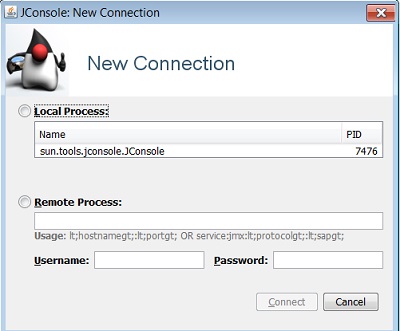
This connection window allows you to specify the connection information from UI instead of the command line.
For more information, see "jconsole" reference page at https://docs.oracle.com/en/java/javase/17/docs/specs/man/jconsole.html.
Table of Contents
javac - The Java Program Compiler
java - The Java Program Launcher
jpackage - Binary Package Builder
javadoc - The Java Document Generator
jdeps - The Java Class Dependency Analyzer
jdeprscan - The Java Deprecated API Scanner
jcmd - The JVM Diagnostic Tool
►jconsole - Java Monitoring and Management Console
JMX Technology and jconsole Tool
►jconsole - Command Options and Connection Window
com.sun.management.jmxremote - JMX Agent for Local Connection
jconsole - Connecting to a Local JMX Agent
com.sun.management.jmxremote.port - JMX Agent for Remote Connection
jconsole - Connecting to a Remote JMX Agent
jstat - JVM Statistics Monitoring Tool
jhsdb - The Java HotSpot Debugger
jvisualvm (Java VisualVM) - JVM Visual Tool
javap - The Java Class File Disassembler
keytool - Public Key Certificate Tool
jrunscript - Script Code Shell
native2ascii - Native-to-ASCII Encoding Converter