Windows Tutorials - Herong's Tutorial Examples - v5.62, by Dr. Herong Yang
Home Network Modem Gateway Configuration
This section provides a tutorial example of how to view the modem gateway configuration settings with a Web browser.
The installation guide provided by the telephone company also tells us how to review the modem gateway configuration and make changes if needed. Here is what we did by following the guide:
1. Open a Web browser and enter this address: http://192.168.2.1/. A Web page shows up as shown in this picture:
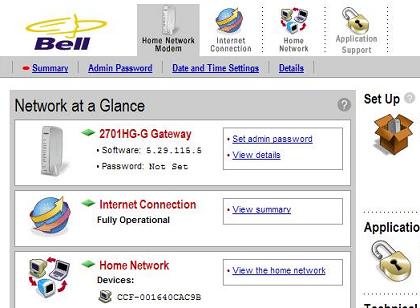
2. Read the information on the page carefully. The IP address actually represents a small special computer inside the modem. That computer controls the modem configuration and offers Web pages allowing us to view and change configuration settings.
3. Visit all 4 configuration areas listed as icons on top of the page:
- Home Network Modem - Overall configuration with entry points to "Network at a Glance", "Admin Password", "Date and Time Settings", "Modem Details", and "Restart the Modem".
- Internet Connection - Configuration settings related to the PPP network, which connects the DSL modem to the DSL server at the telephone company. This area has entry points to "Internet Connection Details", "Internet Connection Diagnostics", "Internet Connection Statistics", and "Internet Connection Advanced Settings".
- Home Network - Configuration settings related to the home network, which connects multiple home computers together using the modem as a hub. This area has entry points to "Home Network Summary", "Settings for Each Computer", "Home Network Wireless Settings", and "Home Network Advanced Settings".
- Application Support - Configuration settings related to blocking home computers from using various Internet applications. This area has entry points to "Enable Application Support for Each Computer", and "Advanced Settings on Internet Protocols".
See next sections for more tutorial examples on viewing and changing configuration settings of different areas.
Table of Contents
Introduction to Microsoft Windows
Introduction to Windows Explorer
Introduction to Internet Explorer
"Paint" Program and Computer Graphics
GIMP - GNU Image Manipulation Program
JPEG Image File Format Quality and Size
GIF Image File Format and Transparent Background
"WinZip" - ZIP File Compression Tool
"WinRAR" - RAR and ZIP File Compression Tool
FTP Server, Client and Commands
"FileZilla" - Free FTP Client and Server
Web Server Log Files and Analysis Tool - "Analog"
Spyware Adware Detection and Removal
IE Addon Program Listing and Removal
Vundo (VirtuMonde/VirtuMundo) - vtsts.dll Removal
Trojan and Malware "Puper" Description and Removal
VSToolbar (VSAdd-in.dll) - Description and Removal
Spybot - Spyware Blocker, Detection and Removal
Setting Up and Using Crossover Cable Network
►Home Network Gateway - DSL Modem/Wireless Router
Wireless DSL Modem Gateway - Connection View
Wireless DSL Modem Gateway - Network View
DSL Modem Connection and DSL Filters
Connecting a Computer to the DSL Modem with a Cable
►Home Network Modem Gateway Configuration
DSL Modem Internet Connection Details
Home Network Configuration Summary
Home Network Wireless Connection Settings
Windows Task Manager - The System Performance Tool
"tasklist" Command Line Tool to List Process Information
"msconfig" - System Configuration Tool
Configuring and Managing System Services
Windows Registry Key and Value Management Tools