Java Tools Tutorials - Herong's Tutorial Notes - Version 5.32, by Dr. Herong Yang
'jstatd' - JVM Remote Monitoring Server
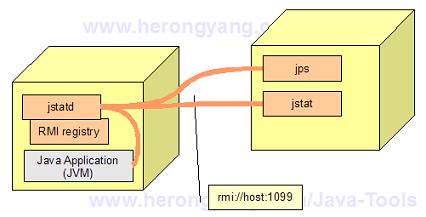
This section describes the JVM remote monitoring server 'jstatd' and its options. 'jstatd' are used to allow JVM monitoring tools 'jps' and 'jstat' to access local JVM processes from a remote machine.
"jstatd": A server that allows JVM monitoring tools like "jps" and "jstat" to access JVM processes from a remote machine. "jstatd" tool is distributed as part of the Sun JDK package and represented by the \Progra~1\java\jdk1.8.0\bin\jstatd.exe program file. "jstatd" can be executed with the following syntax:
jstatd [options]
"jstatd" options are listed below:
- "-p port" Port number where the RMI registry is expected to be found. If not found, an internal RMI registry will be created with this port number.
- "-n rminame" Name to which the remote RMI object is bound in the RMI registry. The default name is JStatRemoteHost.
After "jstatd" is started, JVM monitoring tools, "jps" and "jstat", can connect to it from a remote machine
and access local JVM processes as shown in the picture below:
See next section on how to start "jstatd".
Last update: 2015.
Table of Contents
'javac' - The Java Program Compiler
'java' - The Java Program Launcher
'jconsole' - Java Monitoring and Management Console
►'jstat' - JVM Statistics Monitoring Tool
'jps' - JVM Process Status Tool
Listing JVM Processes on the Local Machine with "jps"
►'jstatd' - JVM Remote Monitoring Server
Starting 'jstatd' with a Security Policy File
Connecting to 'jps' to Remote 'jstatd'
'jstat' Command Options and Parameters
Garbage Collection Testing Program
'jstat -gcutil' - Garbage Collection Statistics
Accessing Remote JVM Processes with 'jstat'
jvisualvm (Java VisualVM) - JVM Visual Tool
'javap' - The Java Class File Disassembler
'keytool' - Public Key Certificate Tool