CD-DVD Tutorials - Herong's Tutorial Examples - v2.23, by Dr. Herong Yang
Viewing VCD Track Layout
This section provides a tutorial on how to view the track and file system layout of a VCD with IsoBuster.
The next test I did was to view the track layout of my VCD with IsoBuster.
1. Insert the VCD into the CD drive. Start IsoBuster.
2. IsoBuster shows sessions and tracks in a tree structure.
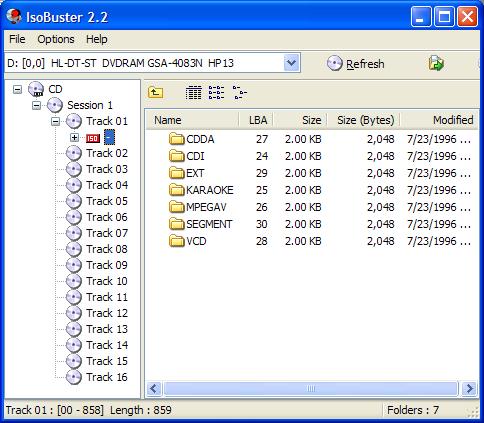
3. Click on Track 01. The ISO icon shows up. So Track 01 is ISO 9660 file system. Click the right mouse button to view its properties box. Track 01 only occupies 859 sectors (from 0 to 858) with 2048 bytes per sector. Track 01 contains only the file directory structure. Contents of MPEG files listed in \MPEGAV directory are stored on separate tracks.
4. Click on Track 02. It has no ISO icon. So Track 02 is has no ISO 9660 file system. It is a pure raw data track. Its properties box shows: 15,537 sectors (from 859 to 16395) with 2048 per sector giving 31,819,776 bytes of capacity.
5. Click on Track 01 > ISO > MPEGAV > MUSIC01.DAT. Its properties box shows: 15,377 sectors (starts from 859) with 2048 per sector giving 31,492,096 bytes. This indicates that MUSIC01.DAT is stored at Track 02. There are 160 sectors not used at the end of the track.
6. Check other tracks.
Conclusion:
- VCD uses the first track to store an ISO 9660 file system to record only the file directory structure.
- Contents of MPEGAV files are stored at separate tracks, one file per track.
- \MPEGAV directory contains MPEGAV file names and starting addresses of separate tracks.
- VCD can not be mapped to a single ISO 9660 image file.
Table of Contents
Audio CD (Compact Disc Digital Audio or CD-DA) Format
Audio CD (Compact Disc Digital Audio or CD-DA) Players
Audio CD (Compact Disc Digital Audio or CD-DA) Rip Music
MP3, MPEG-1 Audio Layer 3, Encoding Format
DVD (Digital Video Disc) Standard Format
TOC (Table Of Contents) on CDs
►IsoBuster - A Nice CD GUI Tool
Downloading and Installing IsoBuster
Viewing CD-DA (Audio CD) Track Layout
vStrip - Rip and Manipulate DVD VOB Files
mpgtx - Manipulating MPEG Files