CD-DVD Tutorials - Herong's Tutorial Examples - v2.23, by Dr. Herong Yang
Viewing CD-DA (Audio CD) Track Layout
This section provides a tutorial on how to view the track layout of an Audio CD with IsoBuster.
The next test I did was to view the track layout of an Audio CD (CD-DA) with IsoBuster.
1. Insert the Audio CD into the CD drive. Start IsoBuster.
2. IsoBuster shows sessions and tracks in a tree structure.
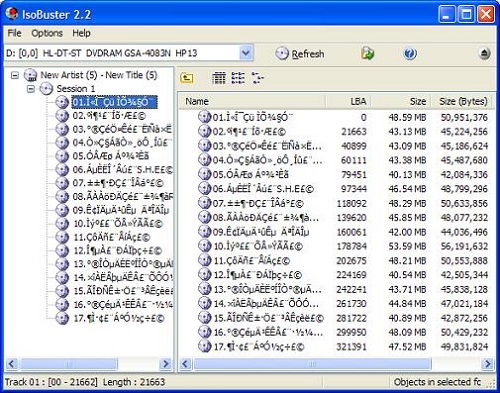
3. Click on Track 01. It has no ISO icon. So Track 01 is has no ISO 9660 file system. It is a pure raw data track. Click the right mouse button to view its properties box. Track 01 occupies 21,656 sectors (from 0 to 21,655) with 2352 bytes per sector, giving 50,934,912 bytes.
4. Check other tracks. They have similar properties.
Conclusion:
- Audio CD uses a very simple track structure. One track one music.
- Sector (block) size is 2352 bytes.
Table of Contents
Audio CD (Compact Disc Digital Audio or CD-DA) Format
Audio CD (Compact Disc Digital Audio or CD-DA) Players
Audio CD (Compact Disc Digital Audio or CD-DA) Rip Music
MP3, MPEG-1 Audio Layer 3, Encoding Format
DVD (Digital Video Disc) Standard Format
TOC (Table Of Contents) on CDs
►IsoBuster - A Nice CD GUI Tool
Downloading and Installing IsoBuster
►Viewing CD-DA (Audio CD) Track Layout
vStrip - Rip and Manipulate DVD VOB Files
mpgtx - Manipulating MPEG Files