CD-DVD Tutorials - Herong's Tutorial Examples - v2.23, by Dr. Herong Yang
Rip Music to MP3 with Windows Media Player
This section provides a tutorial on how to rip music off an audio CD (Compact Disc Digital Audio or CD-DA) to MP3 music files with Windows Media Player.
New version of Windows Media Player can not only play music from an audio CD, but it can also rip music off an audio CD and convert it into MP3 file. MP3, MPEG-1 Audio Layer 3, is an audio encoding format which greatly compress audio sample data stored on audio CDs.
Here is what I did to rip music from my audio CD into MP3 files with Windows Media Player version 10.
0. Create a folder C:\temp\mp3 on your hard disk to store ripped music files.
1. Start Windows Media Player.
2. Click the dropdown menu icon in the title bar, select Tools menu, and select Options sub-menu. The Options dialog box shows up.
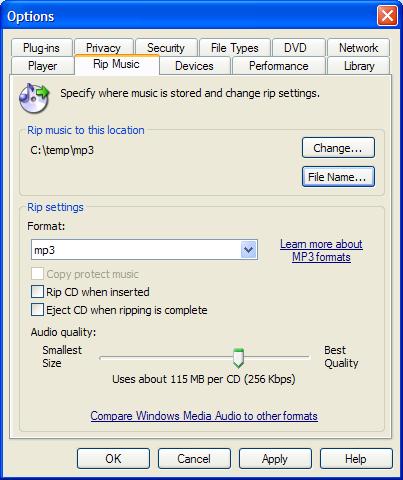
3. Click the Rip Music tap, and make the following changes:
Rip music to this location: C:\temp\mp3
Rip settings - Format: mp3
Rip settings - Audio quality: Uses about 115 MB per CD (256 Kpbs)
4. Insert my audio CD into the CD drive.
5. Click the Rip tab. De-select all tracks and select track 1 and track 7. Then click the Rip Music icon. Windows Media Player starts to rip selected music tracks from the audio CD and convert them into MP3 files.
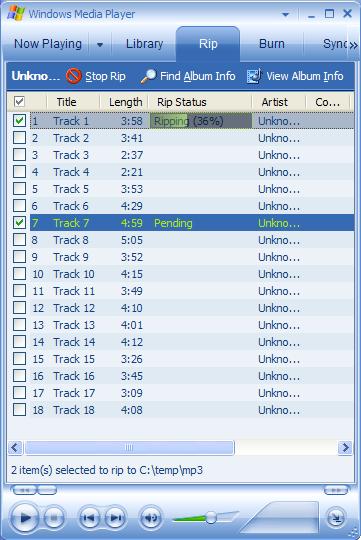
6. After testing 2 tracks, re-select all tracks and rip them off to MP3 files.
Unfortunately, the ripping process failed on track #8 and #10 with this error message: "Windows Media Player cannot play the CD. The disc might be dirty or damaged. Turn error correct, and then try again." No MP3 files generated for track #8 and #10.
This behavior is bad. I think Windows Media Player should pad the bad audio frame and generate MP3 files. I need to search for a better music rip software.
Table of Contents
Audio CD (Compact Disc Digital Audio or CD-DA) Format
Audio CD (Compact Disc Digital Audio or CD-DA) Players
►Audio CD (Compact Disc Digital Audio or CD-DA) Rip Music
►Rip Music to MP3 with Windows Media Player
Checking MP3 Files Generated by Windows Media Player
Rip Music to WMA with Windows Media Player
Checking WMA Files Generated by Windows Media Player
Rip Music to WAV Files with FreeRIP
Checking WAV Files Generated by FreeRIP
Rip Music to MP3 Files with FreeRIP
Checking MP3 Files Generated by FreeRIP
Rip Music to WMA Files with FreeRIP
Checking WMA Files Generated by FreeRIP
MP3, MPEG-1 Audio Layer 3, Encoding Format
DVD (Digital Video Disc) Standard Format
TOC (Table Of Contents) on CDs
IsoBuster - A Nice CD GUI Tool
vStrip - Rip and Manipulate DVD VOB Files
mpgtx - Manipulating MPEG Files