Unicode Tutorials - Herong's Tutorial Examples - v5.32, by Herong Yang
Saving UTF-8 Text Files
This section provides a tutorial example to prove that Excel can not save a UTF-8 text file. Its Save As Type only supports the Unicode Text (*.txt) encoding.
After testing the Excel open function, now I want to test the save function with the UTF-8 encoding.
1. Run Excel and open hello.utf-8 correctly with the "65001 : Unicode (UTF-8)" encoding option selected.
2. Click the File > "Save As" menu. The "Save As" dialog box comes up.
3. Excel does not provide the UTF-8 encoding in the "Save as type" list. It only provides "Text (Tab delimited) (*.txt)" and "Unicode Text (*.txt)":
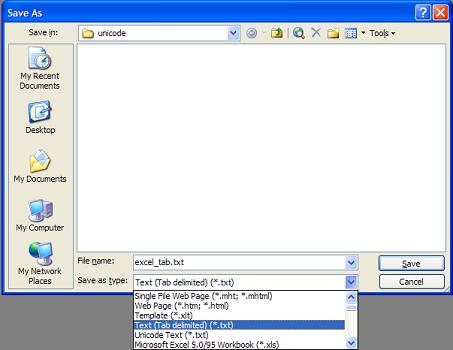
Too bad. This proves that Excel can not save UTF-8 text files.
Table of Contents
ASCII Character Set and Encoding
GB2312 Character Set and Encoding
GB18030 Character Set and Encoding
JIS X0208 Character Set and Encodings
UTF-8 (Unicode Transformation Format - 8-Bit)
UTF-16, UTF-16BE and UTF-16LE Encodings
UTF-32, UTF-32BE and UTF-32LE Encodings
Python Language and Unicode Characters
Java Language and Unicode Characters
Encoding Conversion Programs for Encoded Text Files
Using Notepad as a Unicode Text Editor
Using Microsoft Word as a Unicode Text Editor
►Using Microsoft Excel as a Unicode Text Editor
Saving Files in "Unicode Text (*.txt)" Option