Unicode Tutorials - Herong's Tutorial Examples - v5.32, by Herong Yang
Opening UTF-16BE Text Files
This section provides a tutorial example to prove that Excel can not open a UTF-16BE text file. Its Text Import Wizard only supports UTF-7 and UTF-8 encodings.
Now let's try to use Excel to open the UTF-16BE text file, hello.utf-16be, created from the previous chapter.
1. Run Excel and click menu File > Open. The Open file dialog box comes up.
2. Select the hello.utf-16be text file and click the Open button. A warning message dialog box comes up:
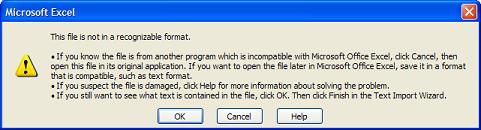
3. Not too bad. The warning message says: "This file is not in a recognized format. ... If you still want to see what text is contained in the file, click OK. Then click Finish in the Text Import Wizard."
4. Ok, let's try to the Text Import Wizard. But Excel does not provide the Unicode Big-Endian encoding in the "File origin" list. It only provides "65000 : Unicode (UTF-7)" and "65001 : (UTF-8)".
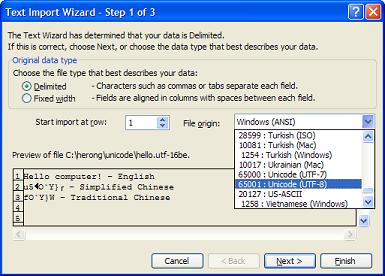
Too bad. This proves that Excel can not open UTF-16BE text files.
Table of Contents
ASCII Character Set and Encoding
GB2312 Character Set and Encoding
GB18030 Character Set and Encoding
JIS X0208 Character Set and Encodings
UTF-8 (Unicode Transformation Format - 8-Bit)
UTF-16, UTF-16BE and UTF-16LE Encodings
UTF-32, UTF-32BE and UTF-32LE Encodings
Python Language and Unicode Characters
Java Language and Unicode Characters
Encoding Conversion Programs for Encoded Text Files
Using Notepad as a Unicode Text Editor
Using Microsoft Word as a Unicode Text Editor
►Using Microsoft Excel as a Unicode Text Editor
Saving Files in "Unicode Text (*.txt)" Option