Java Swing Tutorials - Herong's Tutorial Examples - Version 4.11, by Dr. Herong Yang
showInternal*Dialog() - Displaying Internal Dialog Boxes
This section provides a tutorial example on how to use the static methods, showInternal*Dialog(), to create and display internal dialog boxes inside an parent container.
Dialog boxes can also be created and displayed in side a panel. To do this, you need to call the "Internal" version of show*Dialog() methods:
- showInternalMessageDialog() - Method to create and display an internal message dialog box to present regular, warning or error messages.
- showInternalConfirmDialog() - Method to create and display an internal confirmation dialog box with yes, no and cancel buttons.
- showInternalInputDialog() - Method to create and display an internal input dialog box to prompt for some input.
- showInternalOptionDialog() - Method to create and display an internal generic dialog box to present message, take a confirmation, or take some input.
Note that you can not use a JFrame object directly as the "parent" for internal dialog boxes. If you do, you will get a runtime exception like this:
Exception in thread "AWT-EventQueue-0" java.lang.RuntimeException:
JOptionPane: parentComponent does not have a valid parent
   at javax.swing.JOptionPane.createInternalFrame(
      JOptionPane.java:1486)
   ...
The "parent" input parameter should be the content pane, or other containers.
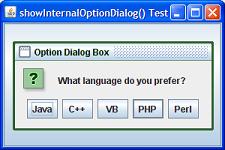
Here is an example program I wrote to test the showInternalOptionDialog() method:
/* JOptionPaneInternalOptionDialog.java
 * Copyright (c) 2014, HerongYang.com, All Rights Reserved.
 */
import java.awt.*;
import java.awt.event.*;
import javax.swing.*;
import javax.swing.event.*;
public class JOptionPaneInternalOptionDialog
   implements ActionListener {
   JFrame myFrame = null;
   public static void main(String[] a) {
      (new JOptionPaneInternalOptionDialog()).test();
   }
   private void test() {
      myFrame = new JFrame("showInternalOptionDialog() Test");
      myFrame.setDefaultCloseOperation(JFrame.EXIT_ON_CLOSE);
      myFrame.setSize(300,200);
      Container myPane = myFrame.getContentPane();
      JButton myButton = new JButton("Show");
      myButton.addActionListener(this);
      myPane.add(myButton);
      myFrame.setVisible(true);
   }
   public void actionPerformed(ActionEvent e) {
      int messageType = JOptionPane.QUESTION_MESSAGE;
      String[] options = {"Java", "C++", "VB", "PHP", "Perl"};
      int code = JOptionPane.showInternalOptionDialog(
         myFrame.getContentPane(),
         "What language do you prefer?",
         "Option Dialog Box", 0, messageType,
         null, options, "PHP");
      System.out.println("Answer: "+code);
   }
}
If you run this example, and click the Show button,
you will see an input dialog box showing up like this:
Sample programs listed in this section have been tested with JDK 1.6.0 to 1.8.0.
Last update: 2014.
Table of Contents
Introduction of Java Swing Package
Graphics Environment of the Local System
JRadioButton - Swing Radio Button Class
JTextField - Swing Text Field Class
Menu Bar, Menus, Menu Items and Listeners
Creating Internal Frames inside the Main Frame
Layout of Components in a Container
javax.swing.JOptionPane - Creating and Displaying Option Dialog Boxes
showMessageDialog() - Displaying Message Dialog Boxes
showConfirmDialog() - Displaying Confirmation Dialog Boxes
Receiving Inputs from Confirmation Dialog Boxes
showInputDialog() - Displaying Input Dialog Boxes
showOptionDialog() - Displaying Option Dialog Boxes
►showInternal*Dialog() - Displaying Internal Dialog Boxes
createDialog() - Creating Dialog Boxes Directly
JEditorPane - The Editor Pane Class