Java Swing Tutorials - Herong's Tutorial Examples - Version 4.11, by Dr. Herong Yang
showInputDialog() - Displaying Input Dialog Boxes
This section provides a tutorial example on how to use the static method, showInputDialog(), to create and display input dialog boxes to take text string input from the user.
The third type of dialog boxes you can create and display with the javax.swing.JOptionPane class is the input dialog box. This can be done with the static method: answer = showInputDialog(frame, message, title, type), where:
- "frame" is a frame object to be used as the parent frame.
- "message" is the message string to be display on the dialog box.
- "title" is the title string to be used as the dialog box title.
- "type" is an integer code representing a specific message dialog box type. Valid type codes are predefined as constants in the JOptionPane class: INFORMATION_MESSAGE, WARNING_MESSAGE, ERROR_MESSAGE and PLAIN_MESSAGE.
- "answer" is the returned string entered by the user on the input dialog box. If no input entered, null will be returned.
Here is an example program I wrote to test the showInputDialog() method:
/* JOptionPaneInputDialog.java
 * Copyright (c) 2014, HerongYang.com, All Rights Reserved.
 */
import java.awt.*;
import java.awt.event.*;
import javax.swing.*;
import javax.swing.event.*;
public class JOptionPaneInputDialog implements ActionListener {
   JFrame myFrame = null;
   public static void main(String[] a) {
      (new JOptionPaneInputDialog()).test();
   }
   private void test() {
      myFrame = new JFrame("showInputDialog() Test");
      myFrame.setDefaultCloseOperation(JFrame.EXIT_ON_CLOSE);
      Container myPane = myFrame.getContentPane();
      JButton myButton = new JButton("Show");
      myButton.addActionListener(this);
      myPane.add(myButton);
      myFrame.pack();
      myFrame.setVisible(true);
   }
   public void actionPerformed(ActionEvent e) {
      int messageType = JOptionPane.INFORMATION_MESSAGE;
      String answer = JOptionPane.showInputDialog(myFrame,
         "What's you name?",
         "Input Dialog Box", messageType);
      System.out.println("Answer: "+answer);
   }
}
If you run this example, and click the Show button,
you will see an input dialog box showing up like this:
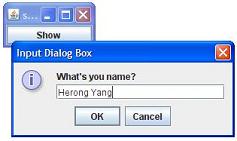
Enter "Herong Yang" in the input field on the input dialog box and click OK. Repeat the test with the Cancel button and the close dialog box icon. You will see some messages printed on the Java console window:
Answer: Herong Yang
Answer: null
Answer: null
Sample programs listed in this section have been tested with JDK 1.6.0 to 1.8.0.
Last update: 2014.
Table of Contents
Introduction of Java Swing Package
Graphics Environment of the Local System
JRadioButton - Swing Radio Button Class
JTextField - Swing Text Field Class
Menu Bar, Menus, Menu Items and Listeners
Creating Internal Frames inside the Main Frame
Layout of Components in a Container
javax.swing.JOptionPane - Creating and Displaying Option Dialog Boxes
showMessageDialog() - Displaying Message Dialog Boxes
showConfirmDialog() - Displaying Confirmation Dialog Boxes
Receiving Inputs from Confirmation Dialog Boxes
►showInputDialog() - Displaying Input Dialog Boxes
showOptionDialog() - Displaying Option Dialog Boxes
showInternal*Dialog() - Displaying Internal Dialog Boxes
createDialog() - Creating Dialog Boxes Directly
JEditorPane - The Editor Pane Class