Windows Tutorials - Herong's Tutorial Examples - v5.62, by Dr. Herong Yang
Extracting All Files from a ZIP File
This section provides a tutorial example on how to extract all files from a ZIP file.
1. Run WinZIP and select menu File > Open Archive. The "Open Archive" dialog box shows up.
2. Select a ZIP file, like c:\temp\test1.zip, and click the OK button. The ZIP file will be opened inside WinZip window.
3. Select menu Actions > Extract. The Extract dialog box shows up.
4. Select a directory where you want the files to be extracted to, for example c:\temp.
5. Click the Extract button as shown in the following picture:
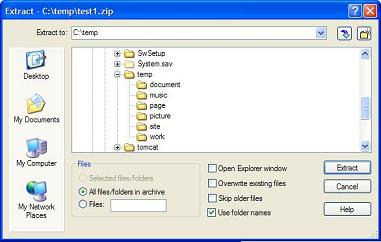
6. All the files in the ZIP will be extract to c:\temp.
Table of Contents
Introduction to Microsoft Windows
Introduction to Windows Explorer
Introduction to Internet Explorer
"Paint" Program and Computer Graphics
GIMP - GNU Image Manipulation Program
JPEG Image File Format Quality and Size
GIF Image File Format and Transparent Background
►"WinZip" - ZIP File Compression Tool
Downloading and Installing WinZip 10.0
Adding Files to a New ZIP File
Adding Directories to a New ZIP File
►Extracting All Files from a ZIP File
Setting Passwords in ZIP Files
Creating a ZIP File on Multiple Diskettes
Setting Windows Explorer Context Menu
"WinRAR" - RAR and ZIP File Compression Tool
FTP Server, Client and Commands
"FileZilla" - Free FTP Client and Server
Web Server Log Files and Analysis Tool - "Analog"
Spyware Adware Detection and Removal
IE Addon Program Listing and Removal
Vundo (VirtuMonde/VirtuMundo) - vtsts.dll Removal
Trojan and Malware "Puper" Description and Removal
VSToolbar (VSAdd-in.dll) - Description and Removal
Spybot - Spyware Blocker, Detection and Removal
Setting Up and Using Crossover Cable Network
Home Network Gateway - DSL Modem/Wireless Router
Windows Task Manager - The System Performance Tool
"tasklist" Command Line Tool to List Process Information
"msconfig" - System Configuration Tool
Configuring and Managing System Services
Windows Registry Key and Value Management Tools