Windows Tutorials - Herong's Tutorial Examples - v5.62, by Dr. Herong Yang
What Are Windows Services and Related Programs
This section describes Windows service related concepts and programs. A diagram is provided to illustrate how installed services, service programs, service configuration programs, and service control programs work together.
What is a Windows Service? A "Windows Service" is an thread of an execution process running continuously in the background without any user intervention. A "Windows Service" is similar in concept to a "Unix Daemon", or a "Background Job" in other operating systems.
There are several elements involved in creating, starting, and managing a "Windows Service":
- The SCM (Service Control Manager) - A Windows system program, that manages installed services and running processes of started services. The SCM, services.exe, is automatically started at system boot time and running in the background.
- A Service Program - An executable program that is be configured to run as a service. A service program needs to be specially coded to interact with the SCM.
- An Installed Service - A registry entry defined to represent a service with several attributes like name, description, startup type, path of the service program, etc.
- A Service Process - A running process resulted from starting an installed service.
- A Registry Editing Program - A user application that allows you to edit registry entries, including installed services. An example of registry editors is "regedit.exe".
- A Service Configuration Program - A user application that allows you to add, modify or delete installed services through SCM. An example of service configuration programs is "sc.exe".
- A Service Control Program - A user application that allows you to start, pause, or stop installed services through SCM. Examples of service control programs are "msconfig.exe" and "services.msc".
- A Process Control Program - A user application that allows you to view or end running processes. Examples of process control programs are "Task Manager" and "tasklist.exe".
To help you manage services on your Windows system, I made this diagram to illustrate how various elements work together:
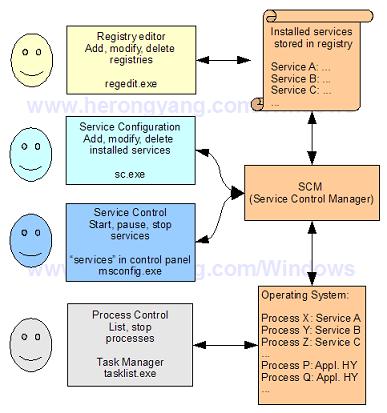
Table of Contents
Introduction to Microsoft Windows
Introduction to Windows Explorer
Introduction to Internet Explorer
"Paint" Program and Computer Graphics
GIMP - GNU Image Manipulation Program
JPEG Image File Format Quality and Size
GIF Image File Format and Transparent Background
"WinZip" - ZIP File Compression Tool
"WinRAR" - RAR and ZIP File Compression Tool
FTP Server, Client and Commands
"FileZilla" - Free FTP Client and Server
Web Server Log Files and Analysis Tool - "Analog"
Spyware Adware Detection and Removal
IE Addon Program Listing and Removal
Vundo (VirtuMonde/VirtuMundo) - vtsts.dll Removal
Trojan and Malware "Puper" Description and Removal
VSToolbar (VSAdd-in.dll) - Description and Removal
Spybot - Spyware Blocker, Detection and Removal
Setting Up and Using Crossover Cable Network
Home Network Gateway - DSL Modem/Wireless Router
Windows Task Manager - The System Performance Tool
"tasklist" Command Line Tool to List Process Information
"msconfig" - System Configuration Tool
►Configuring and Managing System Services
►What Are Windows Services and Related Programs
The Life Cycle of A Service - "Google Updater"
Installed Services in System Registry
"sc.exe" - A Command Line Tool to Manage Services
"sc.exe query type= driver" - All Device Driver Services
"sc.exe query type= service" - All Application Program Services
"sc.exe query/start/stop" - Query, Start or Stop Services
"sc.exe create/delete" - Create or Delete Services
"services.msc" - Program Services Console
"services.msc" - Stoping and Starting Services
"services.msc" - Disabling Services
"Task Manger" - Ending a Service Process
Windows Registry Key and Value Management Tools