Windows Tutorials - Herong's Tutorial Examples - v5.62, by Dr. Herong Yang
Installed Services in System Registry
This section describes installed services stored in the system registry. A tutorial example is provided on how to use 'regedit.exe' to view the registry area where services are stored - HKEY_LOCAL_MACHINE\SYSTEM\CurrentControlSet\Services\.
Now we are ready to review main elements related to system services one by one. The first one I want to look is the system registry area where installed services are stored.
1. Click Start, click Run, type "regedit.exe", and then click OK.
2. Open "HKEY_LOCAL_MACHINE" folder in the Registry Editor.
3. Open "SYSTEM", "CurrentControlSet", and "Services" sub folders.
4. You will see a list of all services installed on the system. This list includes two types of services: Application Program Services and Device Driver Services.
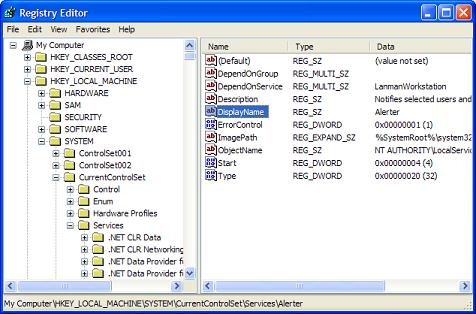
If you are very experienced with system registry and service management, you can create, modify and delete any installed services with "regedit.exe".
Table of Contents
Introduction to Microsoft Windows
Introduction to Windows Explorer
Introduction to Internet Explorer
"Paint" Program and Computer Graphics
GIMP - GNU Image Manipulation Program
JPEG Image File Format Quality and Size
GIF Image File Format and Transparent Background
"WinZip" - ZIP File Compression Tool
"WinRAR" - RAR and ZIP File Compression Tool
FTP Server, Client and Commands
"FileZilla" - Free FTP Client and Server
Web Server Log Files and Analysis Tool - "Analog"
Spyware Adware Detection and Removal
IE Addon Program Listing and Removal
Vundo (VirtuMonde/VirtuMundo) - vtsts.dll Removal
Trojan and Malware "Puper" Description and Removal
VSToolbar (VSAdd-in.dll) - Description and Removal
Spybot - Spyware Blocker, Detection and Removal
Setting Up and Using Crossover Cable Network
Home Network Gateway - DSL Modem/Wireless Router
Windows Task Manager - The System Performance Tool
"tasklist" Command Line Tool to List Process Information
"msconfig" - System Configuration Tool
►Configuring and Managing System Services
What Are Windows Services and Related Programs
The Life Cycle of A Service - "Google Updater"
►Installed Services in System Registry
"sc.exe" - A Command Line Tool to Manage Services
"sc.exe query type= driver" - All Device Driver Services
"sc.exe query type= service" - All Application Program Services
"sc.exe query/start/stop" - Query, Start or Stop Services
"sc.exe create/delete" - Create or Delete Services
"services.msc" - Program Services Console
"services.msc" - Stoping and Starting Services
"services.msc" - Disabling Services
"Task Manger" - Ending a Service Process
Windows Registry Key and Value Management Tools