Windows Tutorials - Herong's Tutorial Examples - v5.62, by Dr. Herong Yang
"Task Manger" - Ending a Service Process
This section provides a tutorial example on how to end a running process that resulted from a started program service using 'Task Manager'.
The last tool listed in my service management diagram is the "Task Manger", which can be used to view and end the running process resulted from a started program service. Here is an tutorial example on how to end the process resulted from the started "Google Updater Service":
1. Use the service console to start the "Google Updater Service".
2. Press "Alt-Ctrl-Delete" and select "Task Manager".
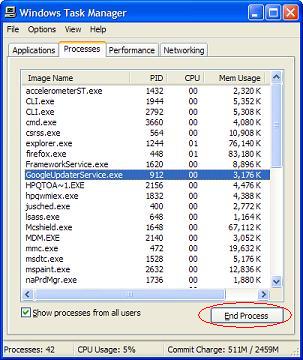
3. Select process "GoogleUpdaterService.exe" which is the running process for the "Google Updater Service".
4. Click the "End Process" button as shown in this picture:
5. This process will be ended.
But when you start your computer next time, "Google Updater Service" will start a running process again. So the best way to stop a service is to disable it or delete it from the registry.
Table of Contents
Introduction to Microsoft Windows
Introduction to Windows Explorer
Introduction to Internet Explorer
"Paint" Program and Computer Graphics
GIMP - GNU Image Manipulation Program
JPEG Image File Format Quality and Size
GIF Image File Format and Transparent Background
"WinZip" - ZIP File Compression Tool
"WinRAR" - RAR and ZIP File Compression Tool
FTP Server, Client and Commands
"FileZilla" - Free FTP Client and Server
Web Server Log Files and Analysis Tool - "Analog"
Spyware Adware Detection and Removal
IE Addon Program Listing and Removal
Vundo (VirtuMonde/VirtuMundo) - vtsts.dll Removal
Trojan and Malware "Puper" Description and Removal
VSToolbar (VSAdd-in.dll) - Description and Removal
Spybot - Spyware Blocker, Detection and Removal
Setting Up and Using Crossover Cable Network
Home Network Gateway - DSL Modem/Wireless Router
Windows Task Manager - The System Performance Tool
"tasklist" Command Line Tool to List Process Information
"msconfig" - System Configuration Tool
►Configuring and Managing System Services
What Are Windows Services and Related Programs
The Life Cycle of A Service - "Google Updater"
Installed Services in System Registry
"sc.exe" - A Command Line Tool to Manage Services
"sc.exe query type= driver" - All Device Driver Services
"sc.exe query type= service" - All Application Program Services
"sc.exe query/start/stop" - Query, Start or Stop Services
"sc.exe create/delete" - Create or Delete Services
"services.msc" - Program Services Console
"services.msc" - Stoping and Starting Services
"services.msc" - Disabling Services
►"Task Manger" - Ending a Service Process
Windows Registry Key and Value Management Tools