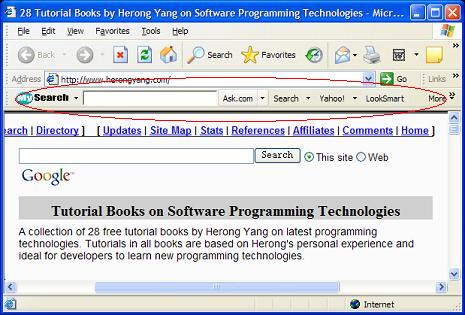
This section provides a tutorial example on how to remove MySearch toolbar - S4BAR.DLL.
Symptom: When MySearch toolbar is installed on your computer,
an extra toolbar shows up on your IE browser as shown in this picture:
MySearch toolbar offers you a quick way to perform a Web search with 3 default search engines:
google.com, yahoo.com, and ask.com.
However, it does take away space from your browser window to make a "bar"
to displays icons for you to invoke its functions. I want to remove it.
My Search Bar   Toolbar                 S4BAR.DLL
My Search BHO   Browser Helper Object   S4BAR.DLL
HijackThis Report: In the report, I saw:
O2 - BHO: My Search BHO - {014DA6C1-189F-421a-88CD-07CFE51CFF10}
   - C:\Program Files\MySearch\bar\1.bin\S4BAR.DLL
O3 - Toolbar: My Search Bar - {014DA6C9-189F-421a-88CD-07CFE51CFF10}
   - C:\Program Files\MySearch\bar\1.bin\S4BAR.DLL
Quick Research: I did a Google search with "MySearch Toolbar"
and got about 4000 matches. One of them has the following description
- http://digitalhub-tips.com/spyware/remove-mysearch-toolbar-spyware/:
Description: This product is fairly benign as it is a basic search
toolbar and it is not dangerous. It is bundled with many different
products, however, and a lot of our users have no idea how they got
it. The user may not mind this toolbar but if they are unaware of
how it was installed they may want to remove it.

Vendor: Ask.com

Threat Level: Low Risk
What I Did:
1. Looked at IE > Internet Options > Programs > Manage Addon, and disabled:
My Search Bar
My Search BHO
2. Went to Control Panel > Add or Remove Programs, and removed "My Search Bar".