Java Swing Tutorials - Herong's Tutorial Examples - Version 4.11, by Dr. Herong Yang
Saving Text from an Editor Pane
This section provides a tutorial example on how to use the getText() method of the javax.swing.JEditorPane class to implement a save file function.
In the next tutorial example, I want to show you how to use the setText() method and the getText() method of the javax.swing.JEditorPane class to implement the "Open" function and the "Save" function of my text editor.
/* JEditorPaneSave.java
 * Copyright (c) 2014, HerongYang.com, All Rights Reserved.
 */
import java.io.*;
import java.nio.*;
import java.awt.event.*;
import javax.swing.*;
public class JEditorPaneSave implements ActionListener {
   JFrame myFrame = null;
   JEditorPane myPane = null;
   public static void main(String[] a) {
      (new JEditorPaneSave()).test();
   }
   private void test() {
      myFrame = new JFrame("JEditorPane Save Test");
      myFrame.setDefaultCloseOperation(JFrame.EXIT_ON_CLOSE);
      myFrame.setSize(300,200);

      myPane = new JEditorPane();
      myPane.setContentType("text/plain");
      myPane.setText(
         "JEditorPane is a text component to edit various kinds of"
         +" content.\n\nThis component uses implementations of the"
         +" EditorKit to accomplish its behavior.");
      myFrame.setContentPane(myPane);

      JMenuBar myBar = new JMenuBar();
      JMenu myMenu = getFileMenu();
      myBar.add(myMenu);
      myFrame.setJMenuBar(myBar);
      myFrame.setVisible(true);
   }
   private JMenu getFileMenu() {
      JMenu myMenu = new JMenu("File");
      JMenuItem myItem = new JMenuItem("Open");
      myItem.addActionListener(this);
      myMenu.add(myItem);

      myItem = new JMenuItem("Save");
      myItem.addActionListener(this);
      myMenu.add(myItem);
      return myMenu;
   }
   public void actionPerformed(ActionEvent e) {
      String cmd = ((AbstractButton) e.getSource()).getText();
      try {
         if (cmd.equals("Open")) {
            FileReader in = new FileReader("JEditorPane.txt");
            char[] buffer = new char[1024];
            int n = in.read(buffer);
            String text = new String(buffer, 0, n);
            myPane.setText(text);
            in.close();
         } else if (cmd.equals("Save")) {
            FileWriter out = new FileWriter("JEditorPane.txt");
            out.write(myPane.getText());
            out.close();
         }
      } catch (Exception f) {
      	 f.printStackTrace();
      }
   }
}
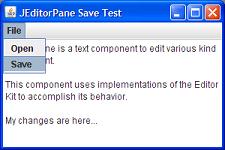
If you run this example, you will see a text editor pane displayed with the initial text content and a menu bar with the "File" menu.
You can edit the text in the editor pane, use the menu to save the changes,
and open it again. See the picture below:
Sample programs listed in this section have been tested with JDK 1.6.0 to 1.8.0.
Last update: 2014.
Table of Contents
Introduction of Java Swing Package
Graphics Environment of the Local System
JRadioButton - Swing Radio Button Class
JTextField - Swing Text Field Class
Menu Bar, Menus, Menu Items and Listeners
Creating Internal Frames inside the Main Frame
Layout of Components in a Container
►JEditorPane - The Editor Pane Class
Creating a Simple Plain Text Editor Pane
►Saving Text from an Editor Pane
Editing HTML in an Editor Pane
Editing Unicode Characters in an Editor Pane
javax.swing.JFileChooser - File Chooser Dialog Box