Java Swing Tutorials - Herong's Tutorial Examples - Version 4.11, by Dr. Herong Yang
Creating a Simple Plain Text Editor Pane
This section provides a tutorial example on how to create a simple plain text editor pane with a call of setText() to set initial text content.
javax.swing.JEditorPane class can be used to create a simple text editor window with two method calls:
- setContentType("text/plain") - Setting the content type to be plain text.
- setText(text) - Setting the initial text content.
Here is an example program I wrote to test the JEditorPane class:
/* JEditorPaneTest.java
 * Copyright (c) 2014, HerongYang.com, All Rights Reserved.
 */
import javax.swing.*;
public class JEditorPaneTest {
   JFrame myFrame = null;
   public static void main(String[] a) {
      (new JEditorPaneTest()).test();
   }
   private void test() {
      myFrame = new JFrame("JEditorPane Test");
      myFrame.setDefaultCloseOperation(JFrame.EXIT_ON_CLOSE);
      myFrame.setSize(300,200);

      JEditorPane myPane = new JEditorPane();
      myPane.setContentType("text/plain");
      myPane.setText(
         "JEditorPane is a text component to edit various kinds of"
         +" content.\n\nThis component uses implementations of the"
         +" EditorKit to accomplish its behavior.");

      myFrame.setContentPane(myPane);
      myFrame.setVisible(true);
   }
}
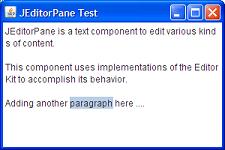
If you run this example, you will see a text editor pane displayed with the initial text content.
You can edit initial text or add more text. You can also select a part of the text
as shown in the picture below:
Sample programs listed in this section have been tested with JDK 1.6.0 to 1.8.0.
Last update: 2014.
Table of Contents
Introduction of Java Swing Package
Graphics Environment of the Local System
JRadioButton - Swing Radio Button Class
JTextField - Swing Text Field Class
Menu Bar, Menus, Menu Items and Listeners
Creating Internal Frames inside the Main Frame
Layout of Components in a Container
►JEditorPane - The Editor Pane Class
►Creating a Simple Plain Text Editor Pane
Saving Text from an Editor Pane
Editing HTML in an Editor Pane
Editing Unicode Characters in an Editor Pane
javax.swing.JFileChooser - File Chooser Dialog Box