Chinese Web Sites Using PHP - v2.24, by Herong Yang
Processing Web Form Input in UTF-8
This section describes how to display a Web form and process form input data in UTF-8.
The next test I did was to try to enter UTF-8 characters as Web form input. I wrote a new test PHP script with some interesting features:
- A HTML header tag <meta> is used to set the Web page with charset=utf-8 for UTF-8 encoding.
- A default input text is provided with a French word in UTF-8 encoding. To avoid any encoding conversion, I used HTML entity format to provide the UTF-8 encoded bytes in Hex values. Note that the special French character is encoded in two bytes.
- The received text from the $_REQUEST array is displayed back on the returning Web page as encoded characters. It is also displayed in Hex values to compare with the HEX values of the default text.
<?php
#- Web-Form-Input-UTF8.php
#- Copyright (c) 2005 HerongYang.com. All Rights Reserved.
#
print('<html><head>');
print('<meta http-equiv="Content-Type"'.
' content="text/html; charset=utf-8"/>');
print('</head><body>'."\n");
# Default input text
$input =
'Télévis'
.'ion';
$input_hex = '54C3A96CC3A9766973696F6E';
# Form reply determination
$reply = isset($_REQUEST["Submit"]);
# Process form input data
if ($reply) {
if (isset($_REQUEST["Input"])) {
$input = $_REQUEST["Input"];
}
}
# Display form
print('<form>');
print('<input type="Text" size="40" maxlength="64"'
. ' name="Input" value="'.$input.'"/><br/>');
print('<input type="Submit" name="Submit" value="Submit"/>');
print('</form>'."\n");
# Display reply
if ($reply) {
print('<pre>'."\n");
print('Content-Type:'."\n");
print(' text/html; charset=utf-8'."\n");
print('You have submitted:'."\n");
print(' Text = '.$input."\n");
print(' Text in HEX = '.strtoupper(bin2hex($input))."\n");
print(' Default HEX = '.$input_hex."\n");
print('</pre>'."\n");
}
print('</body></html>');
?>
After moving this PHP script file to Apache server document directory, I tested it with Internet Explorer (IE) with this URL: http://localhost/Web-Form-Input-UTF8.php. I saw a Web page with a form that has the suggested input text and a submit button.
However, the French characters in the default text encoded in UTF-8 were not displayed correctly.
After clicking the submit button, I saw a returning Web page with the same form and a reply section. Since the default text was not displayed correctly, the PHP received incorrect UTF-8 byte sequences:
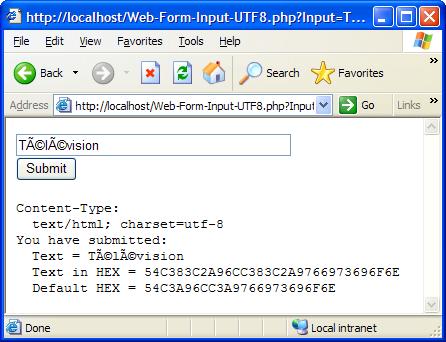
It is interesting to note that the return Web page has a special URL which contains the input text inside the query string. The special characters are included as Hex values of UTF-8 byte sequences:
http://localhost/Web-Form-Input-UTF8.php
  ?Input=T%C3%83%C2%A9l%C3%83%C2%A9vision&Submit=Submit
Conclusion: IE can not take UTF-8 byte sequences as Hex values in the format like 쎩.
Table of Contents
PHP Installation on Windows Systems
Integrating PHP with Apache Web Server
charset="*" - Encodings on Chinese Web Pages
Chinese Characters in PHP String Literals
Multibyte String Functions in UTF-8 Encoding
►Input Text Data from Web Forms
Processing Web Form Input in ASCII
Processing Web Form Input in Latin1 Encoding Error
Processing Web Form Input in Latin1
Entering Latin1 Characters with Alt Keycodes
Testing Latin1 Alt Keycodes with IE
►Processing Web Form Input in UTF-8
Outputting Form Default Input Text in UTF-8
Testing Alt Keycodes with IE on a UTF-8 Web Page
Input Chinese Text Data from Web Forms
MySQL - Installation on Windows
MySQL - Connecting PHP to Database
MySQL - Character Set and Encoding
MySQL - Sending Non-ASCII Text to MySQL
Retrieving Chinese Text from Database to Web Pages
Input Chinese Text Data to MySQL Database