Chinese Web Sites Using PHP - v2.24, by Herong Yang
Steps and Components Involved
This section describes steps and application components involved in inputting non-ASCII characters through Web forms.
In order to capture input text from Web forms and display it back on Web pages properly, you need to understand how an input text is being collected by the Web browser, and delivered to the PHP engine through various application components. Here is a simplified diagram that shows the steps and application components involved in this process:
F1. Key Sequences from keyboard
      |
      |- Web browser
      v
F2. HTTP Request
      |
      |- Web server
      v
F3. CGI input
      |
      |- PHP engine
      v
F4. CGI output
      |
      |- Web server
      v
F5. HTTP response (HTML document)
      |
      |- Web browser
      v
F6. Characters on the screen
If you decided to use UTF-8 encoding to handle non-ASCII characters, you need to make sure that all application components mentioned in the above diagram are friendly to UTF-8 encoding. See the following picture:
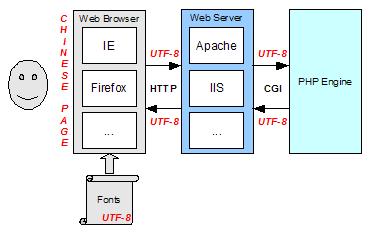
Table of Contents
PHP Installation on Windows Systems
Integrating PHP with Apache Web Server
charset="*" - Encodings on Chinese Web Pages
Chinese Characters in PHP String Literals
Multibyte String Functions in UTF-8 Encoding
►Input Text Data from Web Forms
►Steps and Components Involved
Processing Web Form Input in ASCII
Processing Web Form Input in Latin1 Encoding Error
Processing Web Form Input in Latin1
Entering Latin1 Characters with Alt Keycodes
Testing Latin1 Alt Keycodes with IE
Processing Web Form Input in UTF-8
Outputting Form Default Input Text in UTF-8
Testing Alt Keycodes with IE on a UTF-8 Web Page
Input Chinese Text Data from Web Forms
MySQL - Installation on Windows
MySQL - Connecting PHP to Database
MySQL - Character Set and Encoding
MySQL - Sending Non-ASCII Text to MySQL
Retrieving Chinese Text from Database to Web Pages
Input Chinese Text Data to MySQL Database