Chinese Web Sites Using PHP - v2.24, by Herong Yang
Testing Latin1 Alt Keycodes with IE
This section provides a test on Latin1 Alt keycodes with Internet Explorer (IE).
To test on entering Latin1 characters as Alt keycodes, I used the same PHP script, Web-Form-Input-Latin1.php, described in the previous section.
1. Start Internet Explorer (IE) with this URL: http://localhost/Web-Form-Input-Latin1.php.
2. Press the "num lock" key to turn on "num lock" for the numeric key pad.
3. In the text input box, remove the default text. Now enter <Alt>+0128 by pressing and holding down the Alt key and pressing 0, 1, 2, 8 on the numeric key pad. Release the Alt key. The Euro sign shows up.
4. Repeat the same process to enter four more Alt keycodes: <Alt>+0169, <Alt>+0231, <Alt>+0232, and <Alt>+0233.
5. Click the Submit button. The five Latin1 characters shows up on the returning Web page with their Hex number values confirming that the PHP script received them correctly.
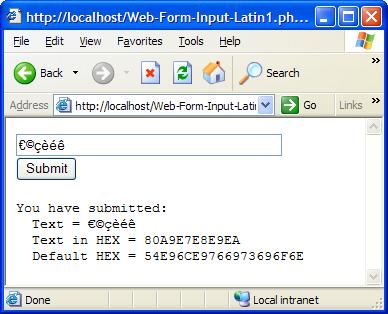
6. Check the page URL in the page address box. The five Latin1 characters are encoded inside the URL:
http://localhost/Web-Form-Input-Latin1.php
  ?Input=%80%A9%E7%E8%E9%EA&Submit=Submit
Conclusion:
- IE default encoding is Latin1, if "charset" is not provided in the HTML header.
- Latin1 characters can be entered into Web forms displayed on IE.
- Latin1 characters can be received by PHP scripts through the $_REQUEST array.
Table of Contents
PHP Installation on Windows Systems
Integrating PHP with Apache Web Server
charset="*" - Encodings on Chinese Web Pages
Chinese Characters in PHP String Literals
Multibyte String Functions in UTF-8 Encoding
►Input Text Data from Web Forms
Processing Web Form Input in ASCII
Processing Web Form Input in Latin1 Encoding Error
Processing Web Form Input in Latin1
Entering Latin1 Characters with Alt Keycodes
►Testing Latin1 Alt Keycodes with IE
Processing Web Form Input in UTF-8
Outputting Form Default Input Text in UTF-8
Testing Alt Keycodes with IE on a UTF-8 Web Page
Input Chinese Text Data from Web Forms
MySQL - Installation on Windows
MySQL - Connecting PHP to Database
MySQL - Character Set and Encoding
MySQL - Sending Non-ASCII Text to MySQL
Retrieving Chinese Text from Database to Web Pages
Input Chinese Text Data to MySQL Database