Building Chinese Web Sites using PHP - Version 2.14, by Dr. Herong Yang
Fetching Chinese Text from Database to Web in UTF-8
This section describes how to fetch Chinese text from MySQL database and send it to a Web page through Apache in UTF-8 encoding.
To fix the problem I had in the previous test, I decided to:
- Tell MySQL to deliver characters from database to PHP in UTF-8 encoding by set MySQL session variable character_set_results=utf8.
- Tell the Web browser to display characters in UTF-8 encoding by set HTML document header meta tag "Content-Type" to "text/html; charset=utf-8".
Here is the new test PHP script that changes MySQL and HTML document settings to display Chinese characters in UTF-8 encoding:
<?php
#- MySQL-Web-Chinese-UTF8.php
#- Copyright (c) 2015, HerongYang.com, All Rights Reserved.
#
  $con = mysql_connect("localhost", "Herong", "TopSecret");
  $ok = mysql_select_db("HerongDB", $con);
  $test_name = "Moving Chinese Text from Database to Web";
  print('<html>');
  print('<meta http-equiv="Content-Type"'.
    ' content="text/html; charset=utf-8"/>');
  print('<body><pre>'."\n");

# Delete the record
  $sql = "DELETE FROM Comment_Mixed WHERE Test_Name ='$test_name'";
  mysql_query($sql, $con);
  print("\nNumber of rows deleted: ".mysql_affected_rows()."\n");

# Build the SQL INSERT statement
  $sql = <<<END_OF_MESSAGE
INSERT INTO Comment_Mixed (Test_name, String_ASCII,
    String_Latin1, String_UTF8, String_GBK, String_Big5)
  VALUES ('$test_name', 'Television',
    X'54E96CE9766973696F6E',
    X'E794B5E8A786E69CBA2FE99BBBE8A696E6A99F',
    X'B5E7CAD3BBFA',
    X'B971B5F8BEF7');
END_OF_MESSAGE;
  mysql_query($sql, $con);
  print("\nNumber of rows inserted: ".mysql_affected_rows()."\n");

# Set character_set_results
  mysql_query("SET character_set_results=utf8", $con);

# Fetch text data from database
  $sql = "SELECT * FROM Comment_Mixed"
    . " WHERE Test_Name = '$test_name'";
  $res = mysql_query($sql, $con);

# Send text data output
  if ($row = mysql_fetch_array($res)) {
    print("\nTest Name = ".$row['Test_Name']."\n");
    print("   String_ASCII: ".$row['String_ASCII']."\n");
    print("   String_Latin1: ".$row['String_Latin1']."\n");
    print("   String_UTF8: ".$row['String_UTF8']."\n");
    print("   String_GBK: ".$row['String_GBK']."\n");
    print("   String_Big5: ".$row['String_Big5']."\n");
  }
  mysql_free_result($res);

  mysql_close($con);
  print('</pre></body></html>');
?>
Now the output is perfect. Chinese characters stored in UTF-8, GBK(GB2312) and Big5 are
all correctly displayed on the Web page:
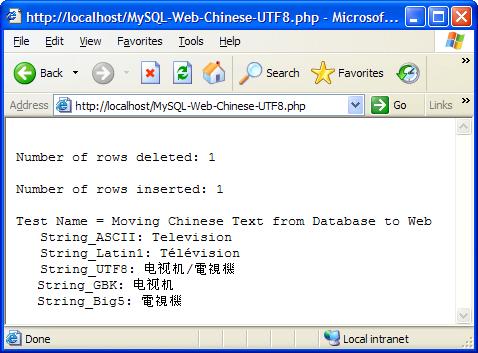
If you are surprised by the fact that Chinese characters in GBK and Big5 encodings are also displayed correctly on a Web page with charset=utf-8, read this explanation:
- When Chinese characters with GBK encoding from the String_GBK column is returned in the result set object, MySQL converted them to the equivalent Chinese characters in UTF-8 encoding.
- When Chinese characters with Big5 encoding from the String_Big5 column is returned in the result set object, MySQL converted them to the equivalent Chinese characters in UTF-8 encoding.
MySQL did a good job on converting my GBK and Big5 encoded characters to UTF-8 encoded characters. I am impressed!
Last update: 2015.
Table of Contents
PHP Installation on Windows Systems
Integrating PHP with Apache Web Server
charset="*" - Encodings on Chinese Web Pages
Chinese Characters in PHP String Literals
Multibyte String Functions in UTF-8 Encoding
Input Text Data from Web Forms
Input Chinese Text Data from Web Forms
MySQL - Installation on Windows
MySQL - Connecting PHP to Database
MySQL - Character Set and Encoding
MySQL - Sending Non-ASCII Text to MySQL
►Retrieving Chinese Text from Database to Web Pages
Steps and Application Components Involved
Fetching ASCII Text from Database to Web
Fetching Chinese Text from Database to Web
►Fetching Chinese Text from Database to Web in UTF-8
Fetching Chinese Text from Database to Web in GBK
Fetching Chinese Text from Database to Web in Big5
Summary - Fetching Chinese Text from Database to Web