Building Chinese Web Sites using PHP - Version 2.14, by Dr. Herong Yang
Fetching Chinese Text from Database to Web
This section describes how to fetch Chinese text from MySQL database and send it to a Web page through Apache.
The next test I did was to try to move Chinese text from MySQL database to a Web page without changing any default settings of MySQL session variables and HTML document headers. In the test PHP script below, I used Hex numbers to insert some Chinese characters in UTF-8, GBK, GB2312, and Big5 encodings. See other chapters in this book on how to insert Chinese characters into MySQL database.
<?php
#- MySQL-Web-Chinese-Default.php
#- Copyright (c) 2015, HerongYang.com, All Rights Reserved.
#
  $con = mysql_connect("localhost", "Herong", "TopSecret");
  $ok = mysql_select_db("HerongDB", $con);
  $test_name = "Moving Chinese Text from Database to Web";
  print('<html>');
  print('<body><pre>'."\n");

# Delete the record
  $sql = "DELETE FROM Comment_Mixed WHERE Test_Name ='$test_name'";
  mysql_query($sql, $con);
  print("\nNumber of rows deleted: ".mysql_affected_rows()."\n");

# Build the SQL INSERT statement
  $sql = <<<END_OF_MESSAGE
INSERT INTO Comment_Mixed (Test_name, String_ASCII,
    String_Latin1, String_UTF8, String_GBK, String_Big5)
  VALUES ('$test_name', 'Television',
    X'54E96CE9766973696F6E',
    X'E794B5E8A786E69CBA2FE99BBBE8A696E6A99F',
    X'B5E7CAD3BBFA',
    X'B971B5F8BEF7');
END_OF_MESSAGE;
  mysql_query($sql, $con);
  print("\nNumber of rows inserted: ".mysql_affected_rows()."\n");

# Fetch text data from database
  $sql = "SELECT * FROM Comment_Mixed"
    . " WHERE Test_Name = '$test_name'";
  $res = mysql_query($sql, $con);

# Send text data output
  if ($row = mysql_fetch_array($res)) {
    print("\nTest Name = ".$row['Test_Name']."\n");
    print("   String_ASCII: ".$row['String_ASCII']."\n");
    print("   String_Latin1: ".$row['String_Latin1']."\n");
    print("   String_UTF8: ".$row['String_UTF8']."\n");
    print("   String_GBK: ".$row['String_GBK']."\n");
    print("   String_Big5: ".$row['String_Big5']."\n");
  }
  mysql_free_result($res);

  mysql_close($con);
  print('</pre></body></html>');
?>
The output is displayed in the picture below:
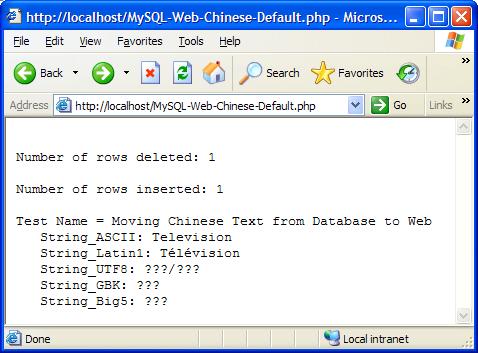
Chinese characters in UTF-8, GBK(GB2312), and Big5 encodings are all failed to show on the Web page. There are possible causes of this error based on what I have from previous tests:
- MySQL did not deliver Chinese characters correctly in the result set object $res. By default, MySQL will convert all text data into Latin1 encoding. Chinese characters can not be converted into Latin1 encoding.
- The HTML document header of the Web page was not set correctly to show Chinese characters. By default, Web browser will display text data in Latin1 encoding. This will cause problems too for Chinese characters.
See the next section for corrections on this test PHP script.
Last update: 2015.
Table of Contents
PHP Installation on Windows Systems
Integrating PHP with Apache Web Server
charset="*" - Encodings on Chinese Web Pages
Chinese Characters in PHP String Literals
Multibyte String Functions in UTF-8 Encoding
Input Text Data from Web Forms
Input Chinese Text Data from Web Forms
MySQL - Installation on Windows
MySQL - Connecting PHP to Database
MySQL - Character Set and Encoding
MySQL - Sending Non-ASCII Text to MySQL
►Retrieving Chinese Text from Database to Web Pages
Steps and Application Components Involved
Fetching ASCII Text from Database to Web
►Fetching Chinese Text from Database to Web
Fetching Chinese Text from Database to Web in UTF-8
Fetching Chinese Text from Database to Web in GBK
Fetching Chinese Text from Database to Web in Big5
Summary - Fetching Chinese Text from Database to Web