Windows Tutorials - Herong's Tutorial Examples - v5.62, by Dr. Herong Yang
McAfee VirusScan and
This section provides several sets of instructions found on the Internet to fully remove trojan Vundo.
VirusScan is one of the McAfee Security products from Network Associates Technology. VirusScan offers the following components:
- VirusScan Consol - The main user interface to configure and use features of VirusScan.
- On-Access Scan - It can be used to automatically scan all files right at the moment they are created by other programs.
- On-Demand Scan - It can be used to scan system current memory or files manually one-time only or multiple times at scheduled times.
To run VirusScan On-Demand Scan, click "Start > All Programs > Network Associates > VirusScan On-Demand Scan". You will the On-Demand Scan window as shown in this picture:
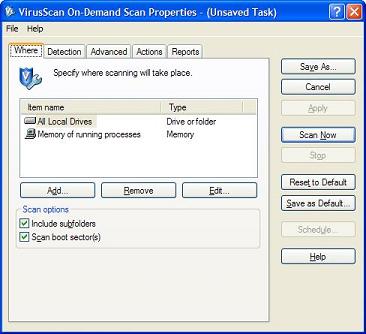
Table of Contents
Introduction to Microsoft Windows
Introduction to Windows Explorer
Introduction to Internet Explorer
"Paint" Program and Computer Graphics
GIMP - GNU Image Manipulation Program
JPEG Image File Format Quality and Size
GIF Image File Format and Transparent Background
"WinZip" - ZIP File Compression Tool
"WinRAR" - RAR and ZIP File Compression Tool
FTP Server, Client and Commands
"FileZilla" - Free FTP Client and Server
Web Server Log Files and Analysis Tool - "Analog"
Spyware Adware Detection and Removal
IE Addon Program Listing and Removal
►Vundo (VirtuMonde/VirtuMundo) - vtsts.dll Removal
Partial Removal of Trojan Vundo
Detecting Trojan Vundo with McAfee VirusScan
Instructions on Full Removal of Trojan Vundo
Removing xxxxxxxx.dll Files Generated by Vundo
What Is Vundo Related vtsts.dll
Finding and Removing vtsts.dll Manually
Removing Trojan Vundo with FixVundo.exe from Symantec
Removing Trojan Vundo with VundoFix.exe from Atribune.org
Trojan and Malware "Puper" Description and Removal
VSToolbar (VSAdd-in.dll) - Description and Removal
Spybot - Spyware Blocker, Detection and Removal
Setting Up and Using Crossover Cable Network
Home Network Gateway - DSL Modem/Wireless Router
Windows Task Manager - The System Performance Tool
"tasklist" Command Line Tool to List Process Information
"msconfig" - System Configuration Tool
Configuring and Managing System Services
Windows Registry Key and Value Management Tools