Java Swing Tutorials - Herong's Tutorial Examples - v4.32, by Herong Yang
javax.swing.event.MenuKeyListener - Menu Key Listener Interface
This section provides a tutorial example on how to use javax.swing.event.MenuKeyListener, menu key listener interface, to catch events fired by JMenuItem objects when a key is typed on the keyboard.
JMenuItem objects also fire events when users interact with them by typing a key on the keyboard. If you want to perform a task when an event occurs on a JMenuItem object, you need to add an event listener to that JMenuItem object. To do this, you need know these Swing classes, interfaces and methods:
javax.swing.event.MenuKeyListener - A Swing interface that allows you to implement your own menu item event handler methods:
- menuKeyTyped(MenuKeyEvent) - Event handler method called when a key is typed on a menu item button. You need to implement this method to perform your own task.
- menuKeyPressed(MenuKeyEvent) - Event handler method called when a key is pressed on a menu item button. You need to implement this method to perform your own task.
- menuKeyReleased(MenuKeyEvent) - Event handler method called when a key is released on a menu item button. You need to implement this method to perform your own task.
javax.swing.event.MenuKeyEvent - A Swing class that represents an event occurred on a menu item. The most important method in this class is:
- getSource() - Method returns the JRootPane object where the event occurred. Not very useful.
- getKeyChar() - Method returns the character represented by the key that triggered event.
- getKeyCode() - Method returns the code value represented by the key that triggered event.
- getKeyText() - Method returns the text name of a given key code value.
- getPath() - Method returns a list of menu objects representing a path in the menu tree. The last object is the JMenuItem object that fired the event.
Here is an example program I wrote to test the MenuKeyListener interface:
/* MenuKeyListenerTest.java
 * Copyright (c) 1997-2024 HerongYang.com. All Rights Reserved.
 */
import javax.swing.*;
import javax.swing.event.*;
public class MenuKeyListenerTest implements MenuKeyListener {
   JFrame myFrame = null;
   public static void main(String[] a) {
      (new MenuKeyListenerTest()).test();
   }
   private void test() {
      myFrame = new JFrame("Menu Listener Test");
      myFrame.setDefaultCloseOperation(JFrame.EXIT_ON_CLOSE);
      myFrame.setBounds(50,50,250,150);
      myFrame.setContentPane(new JDesktopPane());

      JMenuBar myMenuBar = new JMenuBar();
      JMenu myMenu = getFileMenu();
      myMenuBar.add(myMenu);
      myMenu = getColorMenu();
      myMenuBar.add(myMenu);
      myMenu = getOptionMenu();
      myMenuBar.add(myMenu);

      JMenuItem myItem = new JMenuItem("Help");
      myItem.addMenuKeyListener(this);
      myMenuBar.add(myItem);

      myFrame.setJMenuBar(myMenuBar);
      myFrame.setVisible(true);
   }
   private JMenu getFileMenu() {
      JMenu myMenu = new JMenu("File");
      JMenuItem myItem = new JMenuItem("Open");
      myItem.addMenuKeyListener(this);
      myMenu.add(myItem);
      myItem = new JMenuItem("Close");
      myItem.addMenuKeyListener(this);
      myMenu.add(myItem);
      myMenu.addSeparator();
      myItem.addMenuKeyListener(this);
      myItem = new JMenuItem("Exit");
      myMenu.add(myItem);
      return myMenu;
   }
   private JMenu getColorMenu() {
      JMenu myMenu = new JMenu("Color");
      ButtonGroup myGroup = new ButtonGroup();
      JRadioButtonMenuItem myItem = new JRadioButtonMenuItem("Red");
      myItem.setSelected(true);
      myItem.addMenuKeyListener(this);
      myGroup.add(myItem);
      myMenu.add(myItem);
      myItem = new JRadioButtonMenuItem("Green");
      myItem.addMenuKeyListener(this);
      myGroup.add(myItem);
      myMenu.add(myItem);
      myItem = new JRadioButtonMenuItem("Blue");
      myItem.addMenuKeyListener(this);
      myGroup.add(myItem);
      myMenu.add(myItem);
      return myMenu;
   }
   private JMenu getOptionMenu() {
      JMenu myMenu = new JMenu("Option");
      JMenuItem myItem = new JMenuItem("Sound");
      myItem.addMenuKeyListener(this);
      myMenu.add(myItem);
      myItem = new JMenuItem("Auto save");
      myItem.addMenuKeyListener(this);
      myMenu.add(myItem);
      return myMenu;
   }
   public void menuKeyTyped(MenuKeyEvent e) {
      MenuElement[] path = e.getPath();
      JMenuItem item = (JMenuItem) path[path.length-1];
      System.out.println("Key typed: "+e.getKeyChar()
         + ", "+e.getKeyText(e.getKeyCode())
         + " on "+item.getText());
   }
   public void menuKeyPressed(MenuKeyEvent e) {
      MenuElement[] path = e.getPath();
      JMenuItem item = (JMenuItem) path[path.length-1];
      System.out.println("Key pressed: "+e.getKeyChar()
         + ", "+e.getKeyText(e.getKeyCode())
         + " on "+item.getText());
   }
   public void menuKeyReleased(MenuKeyEvent e) {
      MenuElement[] path = e.getPath();
      JMenuItem item = (JMenuItem) path[path.length-1];
      System.out.println("Key released: "+e.getKeyChar()
         + ", "+e.getKeyText(e.getKeyCode())
         + " on "+item.getText());
   }
}
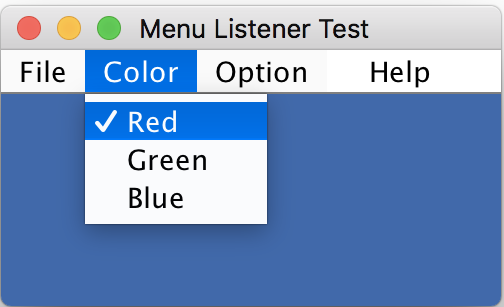
If you run this example, you will see the frame window shows up with the menu bar like this:
If you click the "Color" menu leaving it open, then type the "b" key and the "Shift" key on the keyboard, you will see some messages printed on the Java console window:
Key pressed: b, B on Red
Key pressed: b, B on Green
Key pressed: b, B on Blue
Key pressed: b, B on Help
Key typed: b, Unknown keyCode: 0x0 on Red
Key typed: b, Unknown keyCode: 0x0 on Green
Key typed: b, Unknown keyCode: 0x0 on Blue
Key typed: b, Unknown keyCode: 0x0 on Help
Key released: b, B on Red
Key released: b, B on Green
Key released: b, B on Blue
Key released: b, B on Help
Key pressed: ?, Shift on Red
Key pressed: ?, Shift on Green
Key pressed: ?, Shift on Blue
Key pressed: ?, Shift on Help
Key released: ?, Shift on Red
Key released: ?, Shift on Green
Key released: ?, Shift on Blue
Key released: ?, Shift on Help
Interesting notes about this tutorial example:
- I declared the main class with "public class MenuKeyListenerTest implements MenuKeyListener" to make the main class objects as MenuKeyListener objects.
- "myItem.addMenuKeyListener(this);" statement is used add the MenuKeyListener to all JMenuItem objects.
- "JMenuItem item = (JMenuItem) path[path.length-1];" statement is used to get the last object from menu object path provided by the MenuKeyEvent object.
- When the "b" key was pressed, 4 menu key events were fired, 1 from each menu item that were active on the window at that time. "Red", "Green", and "Bleu" menu items were on the "Color" menu opened by the mouse click. "Help" menu item was listed on the menu bar.
- When the "b" key was typed, 3 types of menu key events were fired in the order of "key pressed", "key typed" and "key released".
- The "key typed" event fired by the "b" key can not return a value key code, This is strange.
- When the "Shift" key is typed, no "key typed" event was fired. This is also strange.
Table of Contents
Introduction of Java Swing Package
Graphics Environment of the Local System
JCheckBox - Swing Check Box Class
JRadioButton - Swing Radio Button Class
JTextField - Swing Text Field Class
JComboBox - Swing Combo Box Class
►Menu Bar, Menus, Menu Items and Listeners
JMenuBar, JMenu, and JMenuItem Classes
JMenuBarTest.java - Menu Bar Test Program
JMenuTest.java - Menu Test Program
JMenuItemTest.java - Menu Item Test Program
JRadioButtonMenuItemTest.java - Radio Button Menu Item Test Program
JCheckBoxMenuItemTest.java - Check Box Menu Item Test Program
javax.swing.event.MenuListener - Menu Listener Interface
JMenuItemActionListenerTest.java - Menu Item Action Listener Test
Item Listener on Radio Button Menu Items
Item Listener on Check Box Menu Items
►javax.swing.event.MenuKeyListener - Menu Key Listener Interface
setMnemonic() - Setting Keyboard Mnemonics on Menu Items
setAccelerator() - Setting Keyboard Accelerators on Menu Items
setMnemonic() - Setting Keyboard Mnemonics on Menus
Creating Internal Frames inside the Main Frame
Layout of Components in a Container
JEditorPane - The Editor Pane Class
SwingWorker - The Background Task Worker
AWT (Abstract Windows Toolkit)