Java Swing Tutorials - Herong's Tutorial Examples - v4.32, by Herong Yang
Item Listener on Check Box Menu Items
This section provides a tutorial example on how to use java.awt.event.ItemListener, radio button and check box item listener interface, to catch state changed item vents on check box menu item objects.
Like JRadioButtonMenuItem, JCheckBoxMenuItem class is a special menu item class, it supports another event listener, ItemListener, which allows you to catch radio button state changed events.
Here is an example program I wrote to test the ItemListener interface on check box menu items:
/* JCheckBoxMenuItemListenerTest.java
 * Copyright (c) 1997-2024 HerongYang.com. All Rights Reserved.
 */
import java.awt.event.*;
import javax.swing.*;
public class JCheckBoxMenuItemListenerTest {
   JFrame myFrame = null;
   public static void main(String[] a) {
      (new JCheckBoxMenuItemListenerTest()).test();
   }
   private void test() {
      myFrame = new JFrame("Menu Listener Test");
      myFrame.setDefaultCloseOperation(JFrame.EXIT_ON_CLOSE);
      myFrame.setBounds(50,50,250,150);
      myFrame.setContentPane(new JDesktopPane());

      JMenuBar myMenuBar = new JMenuBar();
      JMenu myMenu = getFileMenu();
      myMenuBar.add(myMenu);
      myMenu = getOptionMenu();
      myMenuBar.add(myMenu);

      MyMenuItem myItem = new MyMenuItem("Help");
      myMenuBar.add(myItem);

      myFrame.setJMenuBar(myMenuBar);
      myFrame.setVisible(true);
   }
   private JMenu getFileMenu() {
      JMenu myMenu = new JMenu("File");
      MyMenuItem myItem = new MyMenuItem("Open");
      myMenu.add(myItem);
      myItem = new MyMenuItem("Close");
      myMenu.add(myItem);
      myMenu.addSeparator();
      myItem = new MyMenuItem("Exit");
      myMenu.add(myItem);
      return myMenu;
   }
   private JMenu getOptionMenu() {
      JMenu myMenu = new JMenu("Option");
      JCheckBoxMenuItem myItem = new MyCheckBoxMenuItem("Sound");
      myItem.setSelected(true);
      myMenu.add(myItem);
      myItem = new MyCheckBoxMenuItem("Auto save");
      myMenu.add(myItem);
      return myMenu;
   }
   private class MyMenuItem extends JMenuItem
      implements ActionListener {
      public MyMenuItem(String text) {
         super(text);
         addActionListener(this);
      }
      public void actionPerformed(ActionEvent e) {
         System.out.println("Item clicked: "+e.getActionCommand());
      }
   }
   private class MyCheckBoxMenuItem extends JCheckBoxMenuItem
      implements ActionListener, ItemListener {
      public MyCheckBoxMenuItem(String text) {
         super(text);
         addActionListener(this);
         addItemListener(this);
      }
      public void actionPerformed(ActionEvent e) {
         System.out.println("Item clicked: "+e.getActionCommand());
      }
      public void itemStateChanged(ItemEvent e) {
         System.out.println("State changed: "+e.getStateChange()
            +" on "+((MyCheckBoxMenuItem) e.getItem()).getText());
      }
   }
}
If you run this example, you will see the frame window shows up with the menu bar like this:
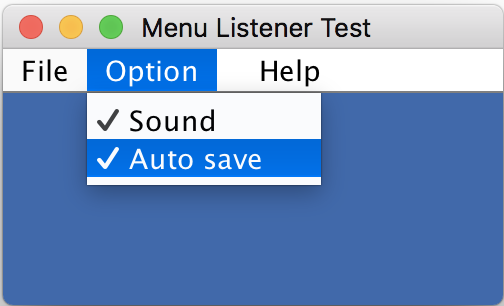
If you click the "Help" menu item and click menu items in the "Option" menu, you will see some messages printed on the Java console window:
State changed: 1 on Sound
Item clicked: Help
State changed: 1 on Auto save
Item clicked: Auto save
State changed: 2 on Sound
Item clicked: Sound
State changed: 2 on Auto save
Item clicked: Auto save
State changed: 1 on Auto save
Item clicked: Auto save
Interesting notes about this tutorial example:
- I used inner class MyCheckBoxMenuItem to create check box menu items with both ActionListener and ItemListener interfaces implemented in the inner class.
- "e.getActionCommand()" expression is used to get action command string, the menu item button text in this case.
- "e.getStateChange()" expression is used to get state changed signal
Table of Contents
Introduction of Java Swing Package
Graphics Environment of the Local System
JCheckBox - Swing Check Box Class
JRadioButton - Swing Radio Button Class
JTextField - Swing Text Field Class
JComboBox - Swing Combo Box Class
►Menu Bar, Menus, Menu Items and Listeners
JMenuBar, JMenu, and JMenuItem Classes
JMenuBarTest.java - Menu Bar Test Program
JMenuTest.java - Menu Test Program
JMenuItemTest.java - Menu Item Test Program
JRadioButtonMenuItemTest.java - Radio Button Menu Item Test Program
JCheckBoxMenuItemTest.java - Check Box Menu Item Test Program
javax.swing.event.MenuListener - Menu Listener Interface
JMenuItemActionListenerTest.java - Menu Item Action Listener Test
Item Listener on Radio Button Menu Items
►Item Listener on Check Box Menu Items
javax.swing.event.MenuKeyListener - Menu Key Listener Interface
setMnemonic() - Setting Keyboard Mnemonics on Menu Items
setAccelerator() - Setting Keyboard Accelerators on Menu Items
setMnemonic() - Setting Keyboard Mnemonics on Menus
Creating Internal Frames inside the Main Frame
Layout of Components in a Container
JEditorPane - The Editor Pane Class
SwingWorker - The Background Task Worker
AWT (Abstract Windows Toolkit)