Java Swing Tutorials - Herong's Tutorial Examples - v4.32, by Herong Yang
Drawing Graphics - Using paint() on Frame
This section provides a tutorial example on how to override the paint() method in the javax.swing.JFrame class to draw graphics (a rectangle) on the frame window. This solution is not recommended.
Problem: I want to draw some graphics in a frame.
Solution 1: You can do this very easily by extending JFrame class to create your own frame class so that you can override the paint() method. The paint() method provides you a Graphics object, which will give you utility methods to draw various types of graphics. The following sample code, JFramePaint1.java, shows you how to do this.
/* JFramePaint1.java
 * Copyright (c) 1997-2024 HerongYang.com. All Rights Reserved.
 */
import java.awt.*;
import javax.swing.*;
public class JFramePaint1 {
   public static void main(String[] a) {
      MyJFrame f = new MyJFrame();
      f.setTitle("Drawing Graphics in Frames");
      f.setBounds(100,50,500,300);
      f.setDefaultCloseOperation(JFrame.EXIT_ON_CLOSE);
      f.setVisible(true);
   }
   static class MyJFrame extends JFrame {
      public void paint(Graphics g) {
         g.drawRect(20,10,100,60);
      }
   }
}
If you run this example, you will get:
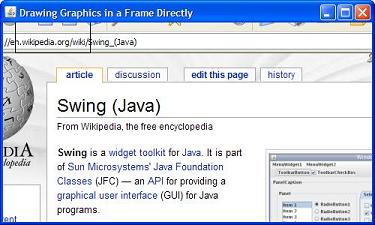
Note 1: The paint() method is inherited by JFrame class from the Component class. It will be called whenever this component should be painted.
Note 2: If you look at the rectangle displayed on the frame, you will see that the origin of the drawing coordinates is located at the top left corner of the entire frame, including the title bar.
Note 3: By default, the paint() method provides transparent background, in JDK 1.4, 1.5 and 1.6. This is why you see a Web page showing up in the picture.
Note 4: In JDK 7 and higher, the paint() method does not provides transparent background.
This solution is not recommended. We don't want to draw graphics in the frame bar area.
Table of Contents
Introduction of Java Swing Package
Graphics Environment of the Local System
Creating Frames with Sizes and Locations
Closing Frame and Terminating Application
Listing and Interrupting AWT Threads
"AWT blocker activation interrupted" Error in JDK 1.6
JFrame Thread Behavior with JDK 8 to 20
Displaying Chinese Characters in Frame Title
►Drawing Graphics - Using paint() on Frame
Drawing Graphics - Using paint() on Component
Drawing Graphics - Using paint() on Content Pane
Drawing Chinese Characters on Frames
JCheckBox - Swing Check Box Class
JRadioButton - Swing Radio Button Class
JTextField - Swing Text Field Class
JComboBox - Swing Combo Box Class
Menu Bar, Menus, Menu Items and Listeners
Creating Internal Frames inside the Main Frame
Layout of Components in a Container
JEditorPane - The Editor Pane Class
SwingWorker - The Background Task Worker
AWT (Abstract Windows Toolkit)