JavaScript Tutorials - Herong's Tutorial Examples - Version 2.21, by Dr. Herong Yang
Changing the Constructor's Prototype Object
This section provides a quick description of what is the default prototype object and how to change it. A tutorial example is provided to create your own prototype object and replace the default prototype object.
In the previous section, we saw that an object is automatically created and assigned to the constructor's "prototype" property when a constructor function is defined.
But if you don't like the object created by the system, you can create an object yourself and assign it to the "prototype" property.
To show you how to replace the default "prototype" object, I wrote the following tutorial example to allow "myBook" to inherit the "year" property stored in the prototype object created by myself:
<html>
<!-- Inheritance_Change_Prototype.html
   Copyright (c) 2013 by Dr. Herong Yang, herongyang.com
-->
<head>
<title>Changing Prototype Object</title>
</head>
<body>
<pre>
<script type="text/javascript">

// Define the constructor: "Book"
function Book(title, author) {
   this.title = title;
   this.author = author;
}

   // Adding a property to the "prototype"
   Book.prototype.price = 9.99;

   // Creating my own prototype object
   myPrototype = new Object();
   myPrototype.year = 2008;

   // Changing the constructor's prototype object
   Book.prototype = myPrototype;

   // Creating an object: "myBook"
   var myBook = new Book("JavaScript Tutorials", "Herong Yang");

   // Showing the object, constructor, and prototype
   showObject(myBook, "myBook");
   showObject(Book, "Book");
   showObject(Book.prototype, "Book.prototype");

function showObject(object, name) {
   document.writeln("\n\""+name+"\" properties:");
   for (var item in object) {
      document.writeln("   "+item+": "+object[item]);
   }
}
</script>
</pre>
</body>
</html>
The output of this tutorial example confirms that the default "prototype" object has been replaced by my own object called "myPrototype":
"myBook" properties:
   title: JavaScript Tutorials
   author: Herong Yang
   year: 2008

"Book" properties:
   prototype: [object Object]

"Book.prototype" properties:
   year: 2008
The diagram below shows what happened during the execution of this tutorial example.
The default object originally assigned to "Book.prototype" is grayed in the diagram.
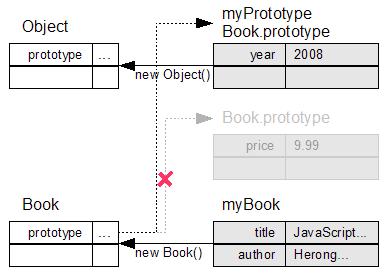
Table of Contents
ECMAScript Language Specification and JavaScript Dialects
Data Types, Variables and Expressions
Creating, Accessing, and Manipulating Arrays
Defining and Calling Functions
Web Browser Supporting JavaScript
Server-Side and Client-Side Web Scripting
Defining Your Own Object Types
►Inheritance of Properties and Methods through the Prototype Object Chain
Inheriting from Constructor's Prototype Object
►Changing the Constructor's Prototype Object
Inheriting Properties from Two Level Prototype Objects
Built-in Properties and Methods in "Object.prototype"
Using "hasOwnProperty()" Method to Test Inherited Properties
Setting the "constructor" Property in the "prototype" Object
Adding Local Methods at the Object Level
Adding Inherited Methods at the Prototype Level
Building Multiple Levels of Prototype Objects
Prototype Object Chain Summary
'jrunscript' - JavaScript Shell Command from JDK
Using Functions as "Function" Objects
Introduction to Built-in Object Types