CD-DVD Tutorials - Herong's Tutorial Examples - v2.23, by Dr. Herong Yang
Editing MP3 ID3 Tags
This section describes how to display and edit ID3 tags stored as part of MP3 files.
MP3 files contains ID3v2 tags used to store information about the MP3 file. This tutorial shows you how to view and edit ID3v2 tags with Windows file properties dialog box.
1. Go to http://music.download.com to download a MP3 music file. I downloaded the music track, A Song of Peace, by Russ Deane. It was saved as C:\temp\mp3\Russ_Deane-A_Song_of_Peace.mp3.
2. Run Windows Explorer, and browse through the folder tree to locate the MP3 file, C:\temp\mp3\Russ_Deane-A_Song_of_Peace.mp3.
3. Click the file name with the right mouse button, and select Properties from the context menu. The file properties dialog box shows up.
4. Click the Summary tab, ID3v2 tags from the MP3 file will be displayed.
5. Click on the Comments tag value column. It will allow to edit the value. I changed the comments to "Test on editing ID3v2 tags".
6. Here is a list of ID3v2 tags and audio information of my downloaded MP3 music file:
Artist:       Russ Deane
Album Title:  http://music.download.com
Year:         2004
Track Number: 1
Genre:        Other
Lyrics:
Title:        A Song of Peace
Comment:      Test on editing ID3v2 tags
Protected:    No
Duration:     0:04:27
Bit Rate:     192 kbps
Channels:     2 (stereo)
Audio sample rate: 44 KHz
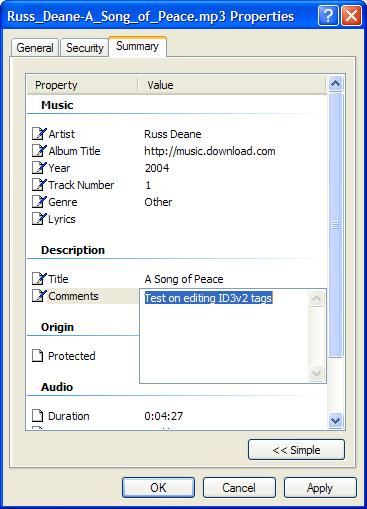
Table of Contents
Audio CD (Compact Disc Digital Audio or CD-DA) Format
Audio CD (Compact Disc Digital Audio or CD-DA) Players
Audio CD (Compact Disc Digital Audio or CD-DA) Rip Music
►MP3, MPEG-1 Audio Layer 3, Encoding Format
DVD (Digital Video Disc) Standard Format
TOC (Table Of Contents) on CDs
IsoBuster - A Nice CD GUI Tool
vStrip - Rip and Manipulate DVD VOB Files
mpgtx - Manipulating MPEG Files