CD-DVD Tutorials - Herong's Tutorial Examples - v2.23, by Dr. Herong Yang
Converting MP3 to WAV
This section describes how to install mp3-2-wav to convert MP3 files to WAV files.
WAV is another audio file format designed to store uncompressed audio data. If you need to convert audio data from MP3 format to WAV format, called MP3 decoding, you can use an audio data conversion software. I tried a freeware mp3-2-wav. It worked nicely.
1. Go to http://www.mp3fe.com/main_mp32wav.htm.
2. Click link "download here!". Then follow the instruction on the download page to download mp3-2-wav. Save the downloaded file to C:\temp\mp32wav.zip.
3. Unzip mp32wav.zip. It will generate C:\temp\mp32wav.exe. Run mp32wav.exe to install mp3-2-wav.
4. Click Start > All Programs > MP3 File Converter > mp3-2-wav converter. mp3-2-wav window shows up.
5. Click START button. The open file dialog box shows up.
6. Select C:\temp\mp3\02-Track 2.mp3. mp3-2-wav displays the output directory selection dialog box.
7. Select C:\temp\mp3 as the output directory. mp3-2-wav starts the conversion process:
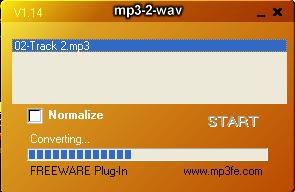
8. The converted file is located at C:\temp\mp3\02-Track 2.wav. Double click the file to play the converted sound track with Windows Media Player.
Table of Contents
Audio CD (Compact Disc Digital Audio or CD-DA) Format
Audio CD (Compact Disc Digital Audio or CD-DA) Players
Audio CD (Compact Disc Digital Audio or CD-DA) Rip Music
►MP3, MPEG-1 Audio Layer 3, Encoding Format
DVD (Digital Video Disc) Standard Format
TOC (Table Of Contents) on CDs
IsoBuster - A Nice CD GUI Tool
vStrip - Rip and Manipulate DVD VOB Files
mpgtx - Manipulating MPEG Files