CD-DVD Tutorials - Herong's Tutorial Examples - v2.23, by Dr. Herong Yang
Playing Movie DVD with Windows Media Player
This section describes a tutorial on how to play a movie DVD with Windows Media Player.
Of course, movies on DVD can be played on standalone DVD player devices. But it can also be played on computers with DVD player software.
Windows systems has a built-in DVD player software called Windows Media Player. On my Windows XP system, I can use following steps to use Windows Media Player to play a movie DVD:
- Click Start > All Programs > Accessories > Entertainment > Windows Media Player. The Windows Media Player screen shows up.
- Insert the movie DVD into the CD driver. Windows Media Player will read the DVD and load all video segments on the DVD.
- A list of all playable items on the movie DVD will be displayed on the right side of the window.
- Click the Play button to start playing the movie on the DVD.
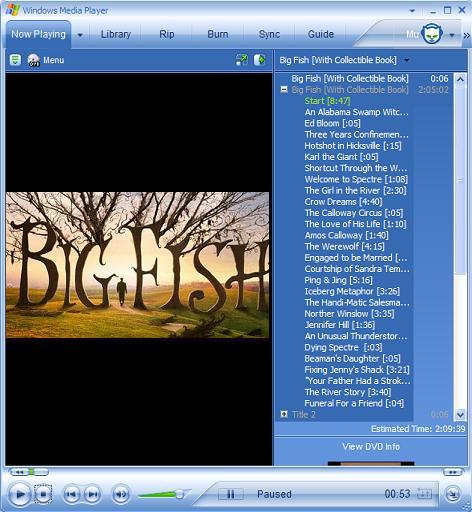
If Windows Media Player failed to auto-load the DVD, you can select menu Play > DVD, VCD or CD Audio to tell it to read the DVD in the CD drive again.
Table of Contents
Audio CD (Compact Disc Digital Audio or CD-DA) Format
Audio CD (Compact Disc Digital Audio or CD-DA) Players
Audio CD (Compact Disc Digital Audio or CD-DA) Rip Music
MP3, MPEG-1 Audio Layer 3, Encoding Format
►DVD (Digital Video Disc) Standard Format
DVD Video (Movie) File Directory Structure
"Big Fish" - Movie DVD File Directory
►Playing Movie DVD with Windows Media Player
Copying VOB Files - Copy Protection Error
TOC (Table Of Contents) on CDs
IsoBuster - A Nice CD GUI Tool
vStrip - Rip and Manipulate DVD VOB Files
mpgtx - Manipulating MPEG Files