CD-DVD Tutorials - Herong's Tutorial Examples - v2.23, by Dr. Herong Yang
Opening Audio CD with Windows Media Player
This section provides a tutorial on how to open an audio CD (Compact Disc Digital Audio or CD-DA) with Windows Media Player.
Windows systems has a built-in audio CD player software called Windows Media Player. On my Windows XP system, I can use following steps to use Windows Media Player to open an audio CD:
- Click Start > All Programs > Accessories > Entertainment > Windows Media Player. The Windows Media Player screen shows up.
- Insert the audio CD into the CD driver. A directory window may show up displaying a list of sound tracks from the audio CD. You can close this window.
- Go back to the Windows Media Player window, click the dropdown list icon next to "Now Playing" tab, and select the option "CD Drive (D:)...". The audio CD information will show up on the right hand side with a list of tracks and their lengths in minutes and seconds of play time.
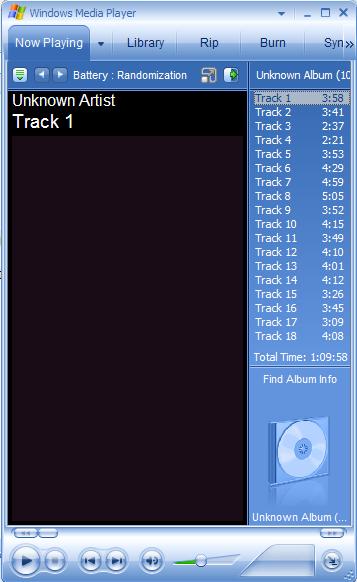
Table of Contents
Audio CD (Compact Disc Digital Audio or CD-DA) Format
►Audio CD (Compact Disc Digital Audio or CD-DA) Players
Audio CD (CD-DA) Player Devices
►Opening Audio CD with Windows Media Player
Playing Music Track with Windows Media Player
Audio CD (Compact Disc Digital Audio or CD-DA) Rip Music
MP3, MPEG-1 Audio Layer 3, Encoding Format
DVD (Digital Video Disc) Standard Format
TOC (Table Of Contents) on CDs
IsoBuster - A Nice CD GUI Tool
vStrip - Rip and Manipulate DVD VOB Files
mpgtx - Manipulating MPEG Files