CD-DVD Tutorials - Herong's Tutorial Examples - v2.23, by Dr. Herong Yang
Playing Music Track with Windows Media Player
This section provides a tutorial on how to play music tracks an audio CD (Compact Disc Digital Audio or CD-DA) with Windows Media Player.
Continue from the previous section. If you want to play music tracks on the audio CD opened by Windows Media Player, just double click on any track name from the track list on the right hand side.
Windows Media Player will locate the selected track on the Audio CD, start to read music sample data and play it.
The video section of the Windows Media Player screen will be filled with an animated image as shown in the following picture.
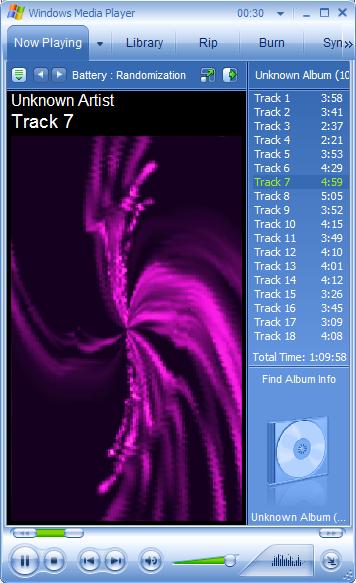
Table of Contents
Audio CD (Compact Disc Digital Audio or CD-DA) Format
►Audio CD (Compact Disc Digital Audio or CD-DA) Players
Audio CD (CD-DA) Player Devices
Opening Audio CD with Windows Media Player
►Playing Music Track with Windows Media Player
Audio CD (Compact Disc Digital Audio or CD-DA) Rip Music
MP3, MPEG-1 Audio Layer 3, Encoding Format
DVD (Digital Video Disc) Standard Format
TOC (Table Of Contents) on CDs
IsoBuster - A Nice CD GUI Tool
vStrip - Rip and Manipulate DVD VOB Files
mpgtx - Manipulating MPEG Files