Website Statistics - HerongYang.com - 3.01, by Herong Yang
Analog CE 6.18 on Mac Computer
This section provides a tutorial example on how to download and install 'Analog CE 6.0.18' on Mac for Web server log file analysis.
Analog CE also supports a "Operating System Report" in the output. It tries to detect the operating system name and version from the user agent field in each log record. In order to detect new operating systems and newer versions of existing operating systems, Analog CE needs to be updated regularly.
So when I saw Analog CE 6.0.18 is available, I tried to download and run it on my Mac computer.
1. Go to https://github.com/c-amie/analog-ce and download analog-6018ce-macos-x86.zip. The file size is 963,554 Byte.
2. Unzip analog-6018ce-macos-x86.zip in /local/analog. And change the file permission to be executable.
herong$ cd /local/analog

herong$ unzip analog-6018ce-macos-x86.zip

herong$ cd analog-6018ce-macos-x86

herong$ chmod 744 analog
3. Try to run it with default settings.
herong$ ./analog

dyld: lazy symbol binding failed: Symbol not found: ____chkstk_darwin
failed!
Too bad. The binary version of Analog CE 6.0.18 for Mac, analog-6018ce-macos-x86.zip, fails to run on my macOS 10.12.6.
Since Analog CE 6.0.18 source code is also available, so I downloaded it and tried on my Mac computer.
1. Go to https://github.com/c-amie/analog-ce and download analog-ce-6.0.18.zip. The file size is 4,847,397 Byte.
2. Unzip analog-ce-6.0.18.zip in /local/analog. And compile it to create executable file using the Makefile.
herong$ cd /local/analog

herong$ unzip analog-ce-6.0.18.zip

herong$ cd analog-ce-6.0.18

herong$ make
  ...
  gcc            -O2     -o ../analog alias.o analog.o cache.o ...
3. Try to run it with default settings. It runs without any issues.
herong$ ./analog

./analog: Analog CE version 6.0.18/Unix
...
4. Now copy over my own configuration file used for previous version, Analog CE 6.0.17. It regenerates a nice report on log files from my web site, herongyang.com with one issue. The Referring Site Report table is empty.
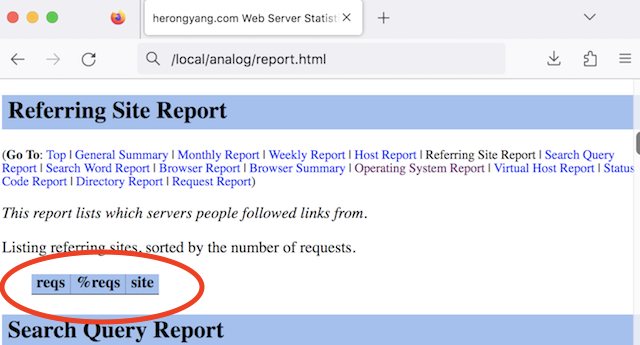
The root cause of the issue could be in my local system libraries, or in the Analog CE source code. I try it again, when I get a new Mac computer.
Table of Contents
►Analog - Web Server Log Files and Analysis Tool
Web Server Log File Samples - IIS and Apache
Analog 6.0/Win32 - Web Log File Analysis Tool
Configuring "Analog" to Process Log Files
Processing Apache Log Files with "Analog"
Analog CE 6.17 on Mac Computer