PKI Tutorials - Herong's Tutorial Examples - v2.34, by Herong Yang
Viewing Trusted Root CA Certificates in Google Chrome
This section provides a tutorial example on how to view trusted root CA certificates that are pre-installed in Google Chrome.
After reviewing the HTTPS server certificate by clicking the security lock icon, I want to know how to view trusted root CA certificates that are pre-installed in Google Chrome.
1. Run Google Chrome, and go to the "Settings" after click the menu icon on top right corner. I see the settings page showing up.
2. Search for "Manage certificates". I see 1 match under "Privacy and security > Security". You may see the match showing up under a different category, if you are using a different version of Chrome.
3. Open the matching category and click the "Manage certificates..." button. I see the "Certificates" tool displaying pre-installed certificates on my Windows computer. You may see a different certificate tool, if you are using a different operating system.
4. Click the "Trusted Root Certificate Authorities" tab in the "Certificates" tool. A list of pre-installed trusted root CA certificates shows up.
5. Double-click "GTE CyberTrust Global Root". I see the certificate details.
Now I know how to view Google Chrome pre-installed certificates. If you click other tabs, you will see some other certificates in different stores:
- Personal - My own certificates.
- Other People - For other people's certificates.
- Intermediate Certificate Authorities - For certificates from Intermediate CAs.
- Trusted Root Certificate Authorities - For certificates from trusted root CAs.
- Trusted Publishers - For certificates from servers that can be trusted without validation.
- Authorities - For certificates from root CAs and intermediate CAs.
- Others - For other certificates.
The picture below shows you the Certificates manager in Google Chrome displaying pre-installed certificates on a Windows computer:
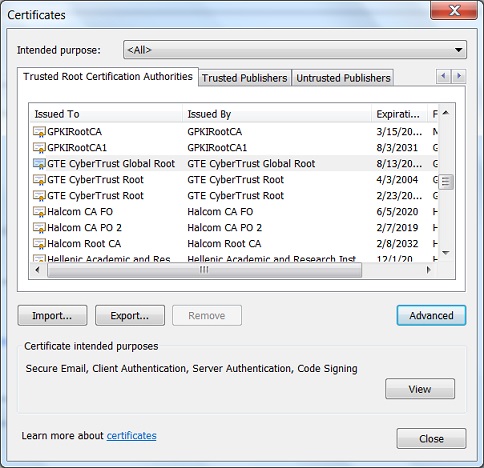
Table of Contents
Introduction of PKI (Public Key Infrastructure)
Introduction of HTTPS (Hypertext Transfer Protocol Secure)
►Using HTTPS with Google Chrome
Visiting "HTTPS" Website with Google Chrome
Viewing Server Certificate in Google Chrome
Viewing Server Certificate Chain in Google Chrome
Exporting Server Certificate to File in Google Chrome
►Viewing Trusted Root CA Certificates in Google Chrome
Listing of Trusted Root CA in Google Chrome
Exporting Root Certificate to File from Google Chrome
Deleting Root CA Certificates from Google Chrome
Google Chrome Shares Windows PKI with IE
Using HTTPS with Mozilla Firefox
Using HTTPS with Microsoft Edge
Using HTTPS with IE (Internet Explorer)
Android and Server Certificate
Windows Certificate Stores and Console
RDP (Remote Desktop Protocol) and Server Certificate
macOS Certificate Stores and Keychain Access
Linux Certificate Stores and Tools
Perl Scripts Communicating with HTTPS Servers
PHP Scripts Communicating with HTTPS Servers
Python Scripts Communicating with HTTPS Servers
Java Programs Communicating with HTTPS Servers
.NET Programs Communicating with HTTPS Servers
CAcert.org - Root CA Offering Free Certificates
PKI CA Administration - Issuing Certificates
Comodo Free Personal Certificate
Digital Signature - Microsoft Word
Digital Signature - OpenOffice.org 3