Windows Tutorials - Herong's Tutorial Examples - v5.62, by Dr. Herong Yang
Deleting Cookies Stored in IE
This section provides a tutorial example on how to delete all cookies currently stored in IE and change settings to ask IE to block potential tracking cookies.
Cookies stored on your computer are always a security risk. So I decide to delete all cookies currently stored by IE:
1. Run IE, and click "Tools > Internet Options... > General".
2. Click "Delete Cookies...".
3. Click Privacy tab. Move the slider to Medium High as shown in this picture:
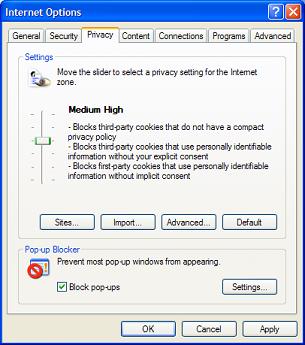
With this setting, IE:
- Blocks third-party cookies that do not have a compact privacy policy.
- Blocks third-party cookies that use personally identifiable information without your explicit consent.
- Blocks first-party cookies that use personal identifiable information without implicit consent.
Table of Contents
Introduction to Microsoft Windows
Introduction to Windows Explorer
Introduction to Internet Explorer
"Paint" Program and Computer Graphics
GIMP - GNU Image Manipulation Program
JPEG Image File Format Quality and Size
GIF Image File Format and Transparent Background
"WinZip" - ZIP File Compression Tool
"WinRAR" - RAR and ZIP File Compression Tool
FTP Server, Client and Commands
"FileZilla" - Free FTP Client and Server
Web Server Log Files and Analysis Tool - "Analog"
Spyware Adware Detection and Removal
IE Addon Program Listing and Removal
Vundo (VirtuMonde/VirtuMundo) - vtsts.dll Removal
Trojan and Malware "Puper" Description and Removal
VSToolbar (VSAdd-in.dll) - Description and Removal
►Spybot - Spyware Blocker, Detection and Removal
Downloading and Installing Spybot 1.4
On-Demand Scanning of SpyWare Infections
What Is AdRevolver Tracking Cookie
Removing Reported Tracking Cookies
Deleting Cookies Stored in Firefox
►Deleting Cookies Stored in IE
Deleting MyWay MySearch Registry Key
Enabling IE Browser Helper SDHelper.dll
Setting Up and Using Crossover Cable Network
Home Network Gateway - DSL Modem/Wireless Router
Windows Task Manager - The System Performance Tool
"tasklist" Command Line Tool to List Process Information
"msconfig" - System Configuration Tool
Configuring and Managing System Services
Windows Registry Key and Value Management Tools