Java Swing Tutorials - Herong's Tutorial Examples - v4.32, by Herong Yang
ActionListener, ChangeListener and ItemListener
This section provides a tutorial example on how to use ActionListener, ChangeListener and ItemListener interfaces to handle different types of events generated on radio buttons.
As you can see from the previous section, a radio button can have 3 types of event listeners: ActionListener, ChangeListener, and ItemListener. The following sample program shows you when those listeners are called, and how many times:
/* JRadioButtonTest.java
 * Copyright (c) 1997-2024 HerongYang.com. All Rights Reserved.
 */
import java.awt.*;
import java.awt.event.*;
import javax.swing.*;
import javax.swing.event.*;
public class JRadioButtonTest {
   public static void main(String[] a) {
      JFrame f = new JFrame("My Radio Buttons");
      f.setDefaultCloseOperation(JFrame.EXIT_ON_CLOSE);
      ButtonGroup g = new ButtonGroup();
      MyRadioButton b1 = new MyRadioButton("On");
      g.add(b1);
      f.getContentPane().add(b1,BorderLayout.NORTH);
      MyRadioButton b2 = new MyRadioButton("Off");
      g.add(b2);
      f.getContentPane().add(b2,BorderLayout.SOUTH);
      f.pack();
      f.setVisible(true);
   }
   private static class MyRadioButton extends JRadioButton
      implements ActionListener, ChangeListener, ItemListener  {
      static int count = 0;
      String text = null;
      public MyRadioButton(String t) {
         super(t);
         text = t;
         addActionListener(this);
         addChangeListener(this);
         addItemListener(this);
      }
      public void actionPerformed(ActionEvent e) {
         count++;
         System.out.println(count+": Action performed - "+text);
      }
      public void stateChanged(ChangeEvent e) {
         count++;
         System.out.println(count+": State changed on - "+text);
      }
      public void itemStateChanged(ItemEvent e) {
         count++;
         System.out.println(count+": Item state changed - "+text);
      }
   }
}
This example program creates two radio buttons and puts them in a single button group. Each button has 3 listeners to handle 3 different types of events. A counter is used in the listener class to help to identify the order of events.
If you run this program, you will see two radio buttons: one labeled as "On" and the other labeled as "Off":
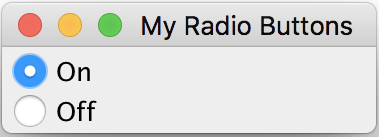
If you press the "On" button and hold it, you will see 2 messages showing in command window. If you release the "On" button, you will see 5 more messages. If you continue to press the "Off" button and hold it, you will see 2 more messages. If you release the "Off" button, you will see 7 more messages. Here is the list of all the messages:
1: State changed on - On
2: State changed on - On     - "On" pressed
3: State changed on - On
4: Item state changed - On
5: State changed on - On
6: Action performed - On
7: State changed on - On     - "On" released
8: State changed on - Off
9: State changed on - Off    - "Off" pressed
10: State changed on - On
11: Item state changed - On
12: State changed on - Off
13: Item state changed - Off
14: State changed on - Off
15: Action performed - Off
16: State changed on - Off   - "Off" released
Note that:
- Action event raised only once when you release a button.
- Change event (stateChanged method call) is raised 2 times when you press a button; and raised 2 time again when you release a button. This tells us that a button has more than 2 states: selected and deselected.
- Item event (itemStateChanged method call) is raised only once when you release a button.
- In a button group, if one button is selected, other selected buttons will be deselected. Events #10 and #11 show that when "Off" is selected, "On" is deselected.
Table of Contents
Introduction of Java Swing Package
Graphics Environment of the Local System
JCheckBox - Swing Check Box Class
►JRadioButton - Swing Radio Button Class
javax.swing.JRadioButton and Related Classes
►ActionListener, ChangeListener and ItemListener
getSelection() - Getting Selected Button
JTextField - Swing Text Field Class
JComboBox - Swing Combo Box Class
Menu Bar, Menus, Menu Items and Listeners
Creating Internal Frames inside the Main Frame
Layout of Components in a Container
JEditorPane - The Editor Pane Class
SwingWorker - The Background Task Worker
AWT (Abstract Windows Toolkit)