Java Swing Tutorials - Herong's Tutorial Examples - v4.32, by Herong Yang
Mouse Click Handler at the Frame Level
This section provides a tutorial example on how to create a button to handle actions by adding the MouseAdapter interface to the frame that contains the button component.
Of course, using ActionListeners is not the only way to handle user clicks on buttons. You can also use MouseListeners to handle user clicks. Here is an example program:
/* JButtonAction3.java
 * Copyright (c) 1997-2024 HerongYang.com. All Rights Reserved.
 */
import java.awt.*;
import java.awt.event.*;
import javax.swing.*;
public class JButtonAction3 extends MouseAdapter {
   JButton myButton = null;
   JLabel myLabel = null;
   String text = null;
   public static void main(String[] a) {
      JButtonAction3 myTest = new JButtonAction3();
      myTest.createFrame();
   }
   public void createFrame() {
      JFrame f = new JFrame("My Switch Button");
      f.setDefaultCloseOperation(JFrame.EXIT_ON_CLOSE);
      Container c = f.getContentPane();
      c.setLayout(new GridLayout(2,1));
      text = "On";
      myButton = new JButton(text);
      myButton.addMouseListener(this);
      c.add(myButton);
      myLabel = new JLabel(text,SwingConstants.CENTER);
      c.add(myLabel);
      f.pack();
      f.setVisible(true);
   }
   public void mouseClicked(MouseEvent e) {
      if (text.equals("On")) text = "Off";
      else text = "On";
      myButton.setText(text);
      myLabel.setText(text);
   }
}
If you run this example, you will get:
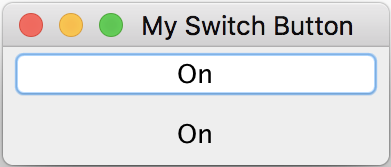
The button works nicely. If you click the button, the button label text will change from "On" to "Off", and the text of the label component will also change.
Table of Contents
Introduction of Java Swing Package
Graphics Environment of the Local System
Creating Buttons with javax.swing.JButton Class
Creating Image Buttons with javax.swing.JButton Class
Button Action Handler at the Component Level
Button Action Handler at the Frame Level
►Mouse Click Handler at the Frame Level
JCheckBox - Swing Check Box Class
JRadioButton - Swing Radio Button Class
JTextField - Swing Text Field Class
JComboBox - Swing Combo Box Class
Menu Bar, Menus, Menu Items and Listeners
Creating Internal Frames inside the Main Frame
Layout of Components in a Container
JEditorPane - The Editor Pane Class
SwingWorker - The Background Task Worker
AWT (Abstract Windows Toolkit)