Chinese Web Sites Using PHP - v2.23, by Herong Yang
Chinese Web Pages with UTF-8 Encoding
This section describes how to create a Chinese HTML document in UTF-8 encoding and publish it on the Apache server.
As I mentioned before, if you have a static HTML document that has Chinese characters, you should enter those Chinese characters with UTF-8 encoding and set the "charset" attribute to "utf-8". Here is a simple test I did on my local system:
1. Click Start > All Programs > Accessories > Notepad.
2. In Notepad, enter the following HTML document:
<html>
<!-- Hello-UTF-8.html
#- Copyright (c) 2005 HerongYang.com. All Rights Reserved.
-->
<meta http-equiv="Content-Type" content="text/html; charset=utf-8"/>
<body>
<b>Chinese characters in UTF-8</b><br/>
Simplified characters: 简体中文网页<br/>
Traditional characters: 繁體中文網頁<br/>
</body>
</html>
Note that I used some Chinese character input add-on tools to enter Chinese characters.
3. Select menu File > Save as. Enter the file name as Hello-UTF-8.html. Select "UTF-8" in the Encoding field and click the Save button.
4. Copy Hello-UTF-8.html to \local\apache\htdocs.
5. Now run Internet Explorer (IE) with http://localhost/Hello-UTF-8.html. You should see Chinese characters displayed correctly:
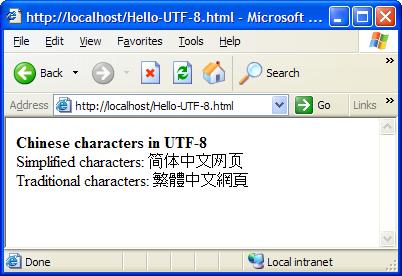
This proves that the editor: notepad, the Web server: Apache, and the Web browser: IE, all worked correctly with Chinese characters in UTF-8 encoding.
Table of Contents
PHP Installation on Windows Systems
Integrating PHP with Apache Web Server
►charset="*" - Encodings on Chinese Web Pages
Chinese Character Set Encoding Options
►Chinese Web Pages with UTF-8 Encoding
Chinese Web Pages with GB18030 Encoding
Chinese Web Pages with Big5 Encoding
UTF-8 Encoding Pages with GB18030 Characters
Chinese Characters in PHP String Literals
Multibyte String Functions in UTF-8 Encoding
Input Text Data from Web Forms
Input Chinese Text Data from Web Forms
MySQL - Installation on Windows
MySQL - Connecting PHP to Database
MySQL - Character Set and Encoding
MySQL - Sending Non-ASCII Text to MySQL
Retrieving Chinese Text from Database to Web Pages
Input Chinese Text Data to MySQL Database