Chinese Web Sites Using PHP - v2.24, by Herong Yang
Chinese Web Pages with GB18030 Encoding
This section describes how to create a Chinese HTML document in GB18030 encoding and publish it on the Apache server.
Chinese Web pages should use UTF-8 encoding. But for some reason, if you have to use GB18030 encoding for your Chinese Web pages, you should enter Chinese characters with GB18030 encoding and set the "charset" attribute to "gb18030". Here is a simple test I did on my local system:
1. Run my Chinese text editor that supports GB18030 encoding.
2. Enter the following HTML document:
<html>
<!-- Hello-GB18030.html
#- Copyright (c) 2005 HerongYang.com. All Rights Reserved.
-->
<meta http-equiv="Content-Type" content="text/html; charset=gb18030"/>
<body>
<b>Chinese characters in GB18030</b><br/>
Simplified characters: ??????<br/>
</body>
</html>
You see some question marks (?) in the source code listed above, because this book uses UTF-8 encoding. GB18030 encoded characters can not be included here.
3. Save the as Hello-GB18030.html in GB18030 encoding. On my Chinese text editor, I had to select "GB text file" as the "Save as type" to ensure my document was saved in GB18030 encoding. Like many other Chinese text editors, it supports multiple encodings. If you are not careful, the document could be saved with a wrong encoding.
4. Copy Hello-GB18030.html to \local\apache\htdocs.
5. Now run Internet Explorer (IE) with http://localhost/Hello-GB18030.html. You should see Chinese characters displayed correctly:
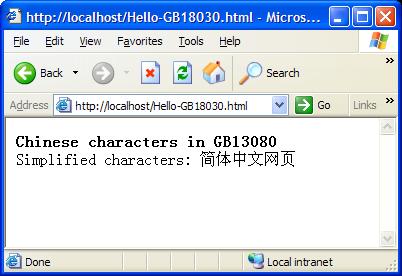
This proves that my Chinese editor, the Web server: Apache, and the Web browser: IE, all worked correctly with Chinese characters in GB18030 encoding.
Note that GB18030 encoding is an extended version of GB2312 encoding, which is still supported by many applications.
Table of Contents
PHP Installation on Windows Systems
Integrating PHP with Apache Web Server
►charset="*" - Encodings on Chinese Web Pages
Chinese Character Set Encoding Options
Chinese Web Pages with UTF-8 Encoding
►Chinese Web Pages with GB18030 Encoding
Chinese Web Pages with Big5 Encoding
UTF-8 Encoding Pages with GB18030 Characters
Chinese Characters in PHP String Literals
Multibyte String Functions in UTF-8 Encoding
Input Text Data from Web Forms
Input Chinese Text Data from Web Forms
MySQL - Installation on Windows
MySQL - Connecting PHP to Database
MySQL - Character Set and Encoding
MySQL - Sending Non-ASCII Text to MySQL
Retrieving Chinese Text from Database to Web Pages
Input Chinese Text Data to MySQL Database