JavaScript Tutorials - Herong's Tutorial Examples - 2.33, by Herong Yang
Server-Side Scripting Overview
This section provides an overview of the Web server-side scripting process flow. The Web server removes the script code and executes it.
Server-side scripting happens in step 4 as shown in the diagram below:
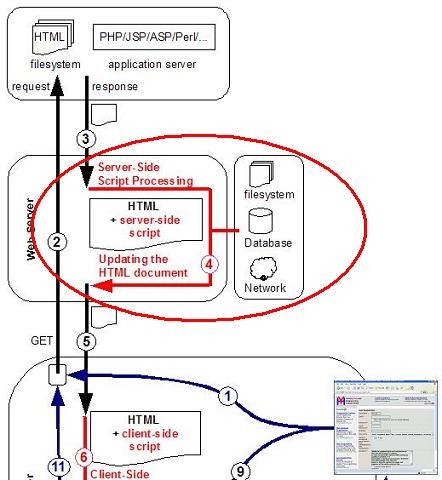
Step 1: The user enters a new Web page address or clicks a link that requires a new Web page from the Web server.
Step 2: The Web browser connects the Web server and sends a HTTP GET command with the path name of the requested Web page.
Step 3: The Web server fetches the HTML document of the requested page or asks an application server to generate the HTML document.
Step 4: The Server-side scripting step: The Web server scans the HTML document for any server-side script code embedded in the document. The Web server will remove the embedded script code and execute it.
When the Web server executes the embedded script code, it will provide many host objects representing the server host environment. Through those host objects, server-side script code can easily access the carrying HTML document, the server filesystem, any databases, and networked computers.
Usually, server-side script code will update the carrying HTML document with dynamic data resulted from its computations.
At the end of the server-side script process step, the updated HTML document is ready to be sent back the client - the Web browser.
Table of Contents
ECMAScript Language Specification and JavaScript Dialects
Data Types, Variables and Expressions
Creating, Accessing, and Manipulating Arrays
Defining and Calling Functions
Web Browser Supporting JavaScript
►Server-Side and Client-Side Web Scripting
Web Scripting Architecture Overview
►Server-Side Scripting Overview
Client-Side Scripts for Document Updating
Client-Side Scripts for Event Handling
Client-Side Scripting Processed Multiple Times
New Script Resulted from Two Original Scripts
Defining Your Own Object Types
Inheritance of Properties and Methods through the Prototype Object Chain
'jrunscript' - JavaScript Shell Command from JDK
Using Functions as "Function" Objects
Introduction to Built-in Object Types
W3C's Document Object Model (DOM) Specifications