JavaScript Tutorials - Herong's Tutorial Examples - 2.33, by Herong Yang
Event Listeners and Objects
This section provides a quick description of event trigger attributes on different HTML tags and the 'event' object representing the event with detail information about the event. A tutorial example is provided to display mouse location by adding a listener to the mouse-pushed-down event.
A typical Web browser also supports special HTML attributes to let you add event listeners and passing event objects. Here are few commonly used HTML attributes on various HTML tags:
- "<body onLoad="listener_code" ...>" - The specified listener code will be executed when the "onLoad" event is triggered by the browser starting to load the HTML document.
- "<body onMouseDown="listener_code" ...>" - The specified listener code will be executed when the "onMouseDown" event is triggered by the user pushing down the mouse button anywhere in the browser window.
- "<a onMouseOver="listener_code" ...>" - The specified listener code will be executed when the "onMouseOver" event is triggered by the user moving mouse over this hyper link.
- "<input type="button" onClick="listener_code" ...>" - The specified listener code will be executed when the "onClick" event is triggered by the user clicking this button.
More event trigger attributes will be introduced in other chapters in this book.
In each event trigger attribute, the browser will provide an object called "event", which presents this event and contains detailed information about this event. This "event" object has various properties and methods for you to use.
To illustrate some nice features of event triggers and the "event" object, I wrote this JavaScript tutorial example:
<html>
<!-- Event_Object_and_Trigger.html
   Copyright (c) 2008 HerongYang.com. All Rights Reserved.
-->
<head>
<title>Event Object and Trigger</title>
</head>
<body onMouseDown=
   "window.alert('X: '+event.clientX+', Y: '+event.clientY);">
<p>Click anywhere on the page to see location coordinates.</p>
</body>
</html>
In this tutorial example, the "onMouseDown" event trigger attribute on the "body" tag is used to add a short listener code to be executed with the user push down the mouse button on the page. The listener code uses the "event" object provided by the browser to retrieve x and y coordinates of the location.
The coordinates are reported back the user with an alert box by calling the "alert()" method on the "window" object. See the picture below:
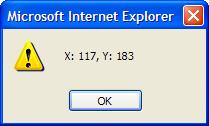
Table of Contents
ECMAScript Language Specification and JavaScript Dialects
Data Types, Variables and Expressions
Creating, Accessing, and Manipulating Arrays
Defining and Calling Functions
►Web Browser Supporting JavaScript
JavaScript Support in Web Browsers
Including JavaScript Codes with HTML "script" Tags
type="text/javascript" or language="JavaScript"
JavaScript Version Supported by Browsers
Including 'script' Tags in String Literals
Escaping 'script' Tags in String Literals
Using HTML Entities to Protect HTML Tags
Including JavaScript Codes as External Files
DOM API - The "document" Object
DOM API - The "window.open" Method
'javascript:' Pseudo-URL Addresses
JavaScript Console in Google Chrome
JavaScript Console in Mozilla Firefox
JavaScript Console in Apple Safari
JavaScript Console in IE (Internet Explorer)
Server-Side and Client-Side Web Scripting
Defining Your Own Object Types
Inheritance of Properties and Methods through the Prototype Object Chain
'jrunscript' - JavaScript Shell Command from JDK
Using Functions as "Function" Objects
Introduction to Built-in Object Types
W3C's Document Object Model (DOM) Specifications