CD-DVD Tutorials - Herong's Tutorial Examples - v2.23, by Dr. Herong Yang
Where Is TOC Located on a CD
This section provides basic information on physical location of TOC (Table Of Contents) CDs.
Every CD (Compact Disc) has a TOC (Table Of Contents) section located in the "lead-in" area on the CD. For an CD-DA, (audio CD), the "lead-in" area is located between radius 23mm and 25mm, as shown on this illustration from www.disctronics.co.uk:
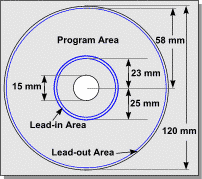
The illustration also shows other interesting areas on a CD:
Radius 22-23mm: Inner buffer zone.
Radius 23-25mm: Lead-in area.
Radius 25-58mm: Program area.
Radius 58-58.5mm: Lead-out area.
Radius 58.5-59mm: Outer buffer zone.
Radius 59-60mm: Rim area.
The size of the "lead-in" area is about, 4,500 sectors with a capacity of about 9 MB.
The TOC in the "lead-in" area contains the total length of the recording session, a list of tracks and their starting addresses and some other information.
Note that on a multi-session CD, each session will have its own "lead-in" area and TOC.
On a recordable/writable CD (CD-R), there is an extra area called PMA (Program Memory Area) before the "lead-in" area. The PMA is located between radius 22.35mm and radius 23m.
The PMA is used by the recording process to store a temporary copy TOC, before the session is closed. After the session is closed, the TOC is written to the "lead-in" area.
Table of Contents
Audio CD (Compact Disc Digital Audio or CD-DA) Format
Audio CD (Compact Disc Digital Audio or CD-DA) Players
Audio CD (Compact Disc Digital Audio or CD-DA) Rip Music
MP3, MPEG-1 Audio Layer 3, Encoding Format
DVD (Digital Video Disc) Standard Format
►TOC (Table Of Contents) on CDs
"readcd -fulltoc" - Reading TOC with "cdrtools"
"readcd -fulltoc" - CD-DA (Audio CD) Sample
"readcd -fulltoc" - Data CD Sample
"readcd -fulltoc" - Multi-Session Data CD Sample
"readcd -fulltoc" - VCD (Video CD) Sample
"readcd -fulltoc" - DVD Sample
IsoBuster - A Nice CD GUI Tool
vStrip - Rip and Manipulate DVD VOB Files
mpgtx - Manipulating MPEG Files