Ubuntu Tutorials - Herong's Tutorial Examples - v1.25, by Herong Yang
Virtual Memory vs. Physical Memory
This section describes virtual memory, which is mapped to physical memory through MMU (Memory Management Unit).
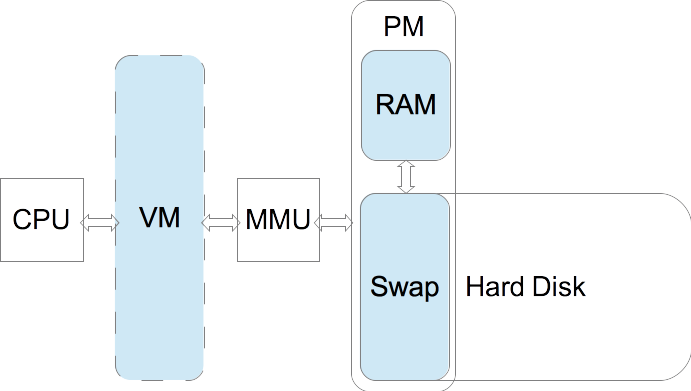
What Is VM (Virtual Memory)? - Virtual Memory (VM) is a memory management technique that provides an abstraction of the storage mapped to PM (Physical Memory), which is combination of RAM and Swap space on hard disk.
What Is MMU (Memory Management Unit)? - Memory Management Unit (MMU) is a hardware unit that manages the mapping between the virtual memory and the physical memory. MMU actually translates a virtual memory address to a physical memory address using page tables.
What Is PM (Physical Memory)? - Physical Memory (PM) is a combination of the RAM (Random Access Memory) and a Swap space configured on the hard disk. This combination allows the computer system to run programs that require memory larger than the RAM.
The diagram below shows how MMU maps VM to PM.
"free" - Display Memory Usage - "free" command displays usage of the physical memory which is combination of RAM and Swap space on hard disk. The following output shows 693,616 KiB used out of the 4,761,456 KiB physical memory.
herong$ free -t

          total    used     free  shared  buff/cache  available
Mem:    3711860  411064  2296828    1780     1003968    3059216
Swap:   1049596  282552   767044
Total:  4761456  693616  3063872
Note that:
- "Mem: ..." line represents the usage of the RAM (main memory).
- "total" column represents total usable memory.
- "used" column represents memory used by individual running processes.
- "shared" column represents memory shared by 2 or more running processes.
- "free" column represents free memory (total - used - buff/cach).
- "buff/cache" column represents memory used by CPU as temporary buffers/caches.
- "available" column represents memory available for new allocations. I am not sure how this number is calculated. Conceptually, it should be: total - used - share.
"top" - Display Memory Usage - "top" command displays resource, including memory, usages of total and individual running processes. The RAM (Mem) and Swap usage numbers matches well with the "free" command output.
herong$ top

top - 21:29:34 up 160 days,  6:33,  1 user,  load average: 0.00, 0.06, 0.07
Tasks: 142 total,   1 running, 141 sleeping,   0 stopped,   0 zombie
%Cpu(s):  1.8 us,  0.5 sy,  0.0 ni, 97.5 id,  0.0 wa,  0.2 hi,  0.0 si, ...

KiB Mem :  3709516 total,  1527380 free,   828344 used,  1353792 buff/cache
KiB Swap:   999420 total,   145444 free,   853976 used.  2472700 avail Mem
...
Table of Contents
Introduction to Ubuntu Systems
GNOME - Desktop Interface and Environment
Shell - The Command-Line Interpreter
Layers of Memory and Access Speed
List CPU Caches and Their Sizes
►Virtual Memory vs. Physical Memory
Buffer Memory and Cache Memory
Verify Cache Memory with "cp" Command
Virtual Memory Mapping and Page Table
"ps -o rss,drs,trs,vsz,sz" - Process Status Options
smem - Process Memory Usage Report
/proc/{id}/maps - Process Memory Map
/proc/{id}/smaps - Process Memory Map Details
earlyoom - A Simple OOM Killer