PHP Modules Tutorials - Herong's Tutorial Examples - v5.18, by Herong Yang
Transparent Image Over Text Web Page
This section provides a tutorial example on how to display a transparent image floating over Web page text.
If you are looking for ways to verify the transparent background of an image, you can use my following HTML document file:
<html><body>
<!-- Display-Transparent-Image.html -->
<img style="position:absolute; top: 50; left: 50;"
  src="GD-Transparent-Graphics.png" border="10"/>
<script type="text/javascript">
for (i=0; i<=2000; i++) {document.write('Bla ');}
</script>
</body></html>
Now open the above HTML file in a Web browser. You should see some text displayed on the Web page, with the transparent image floating above the text.
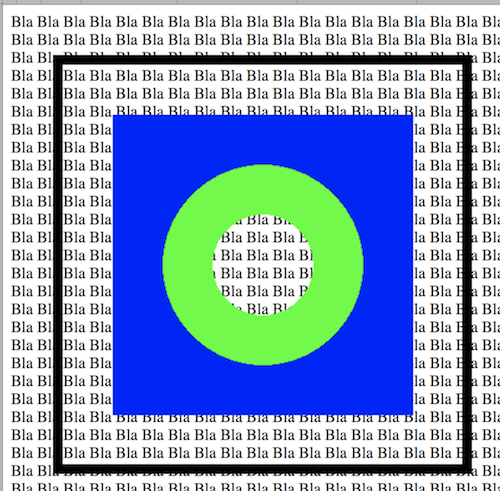
Table of Contents
Introduction and Installation of PHP
Managing PHP Engine and Modules on macOS
Managing PHP Engine and Modules on CentOS
DOM Module - Parsing HTML Documents
►GD Module - Manipulating Images and Pictures
GD Library - Draw Graphical Elements
GD Library - Print 2 Pictures on 1 Page
GD Library - Create Transparent Image
►Transparent Image Over Text Web Page
GD Library - Pad Transparent Image
MySQLi Module - Accessing MySQL Server
OpenSSL Module - Cryptography and SSL/TLS Toolkit
PCRE Module - Perl Compatible Regular Expressions
SOAP Module - Creating and Calling Web Services
SOAP Module - Server Functions and Examples