WSDL Tutorials - Herong's Tutorial Examples - Version 2.03, by Dr. Herong Yang
Submitting Request to MockService
This section provides a tutorial example on how to submit a test request to the mock service. Requests and responses can be viewed on both sides: client side and server side.
Now let's to submit a test request to the MockService.
1. Continue from the previous tutorial.
2. Right click on "Hello" under "helloBinding" binding in the project object tree and select "New Request". A small dialog box shows up.
3. Enter "Hello_Mock_Request" as the request name and click OK. A new request will be created in the request editor.
4. Enter "Hello again." in the HelloRequest element.
5. Click the endpoint dropdown list below the title bar and select "Add new endpoint...". A small dialog box shows up.
6. Enter "http://localhost:8088/mockhelloBinding" and click OK. The mock response received from the mock service will be displayed.
Excellent. I have two bindings working together now:
- "helloBinding" - Representing the client side to send a request to the mock service and receive response from the mock service.
- "helloBinding MockService" - Representing the server side to receive a request from a client and send the mock response to the client.
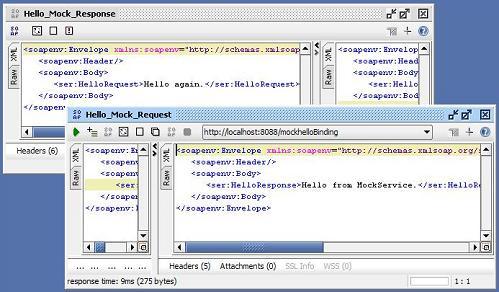
soapUI allows you to view requests and responses on both sides as shown below:
Last update: 2009.
Table of Contents
WSDL 2.0 Document Structure and Syntax
WSDL Version 2.0 Part 2: Adjuncts
WSDL 2.0 Document Examples with SOAP Binding
WSDL 20 Programming APIs and Testing Tools
WSDL 1.1 Document Structure and Syntax
WSDL 1.1 Binding Extension for SOAP 1.1
►soapUI 3.0.1 - Web Service Testing Tool
Downloading and Installing soapUI 3.0.1
Validating and Inspecting WSDL Documents
Using Interface Viewer on Bindings
Generating HTML Documentations On Bindings
Generating Test Requests on Operations
Submit Test Requests to the Server
MockService - Web Service Simulator
►Submitting Request to MockService
Loading Incorrect WSDL Documents
WSDL 1.1 and SOAP 1.1 Examples - Document and RPC Styles
PHP SOAP Extension in PHP 5.3.1
Using WSDL in Perl with SOAP::Lite 0.710
Using WSDL Document in Java with Axis2 1.4.1
Using WSDL2Java to Generate Web Service Stub Classes
WSDL 1.1 Binding Extension for SOAP 1.2
WSDL 1.1 and SOAP 1.2 Examples - Document and RPC Styles