Chinese Web Sites Using PHP - v2.24, by Herong Yang
Copying and Pasting Chinese Input to Big5 Web Forms
This section provides a test on copying and pasting Chinese input text from UTF-8 and GB18030 Web pages to Big5 encoded Web forms.
In this test, I wanted to see if IE allows me to copy and paste Chinese characters from UTF-8 and GB18030 Web pages to Big5 encoded Web forms.
1. Ran IE with this URL: http://localhost/Web-Form-Input-Chinese-Big5.php, and remove the default text from the input box.
2. Ran another IE window with this URL: http://localhost/Web-Form-Input-Chinese-GB18030.php. Copy and paste the Chinese characters from this page to the input box of the Big5 page. Chinese characters show up in the input box correctly.
3. Entered a forward slash (/) in the input box of the GB18030 page.
4. Ran another IE window with this URL: http://localhost/Web-Form-Input-Chinese-UTF8.php. Copied and pasted the Chinese characters from this page to the input box of the Big5 page. The Chinese characters showed up in the input box correctly.
6. Clicked the Submit button on the Big5 page. The pasted characters were received and returned back to the returning Web page. The returned Chinese characters showed up correctly.
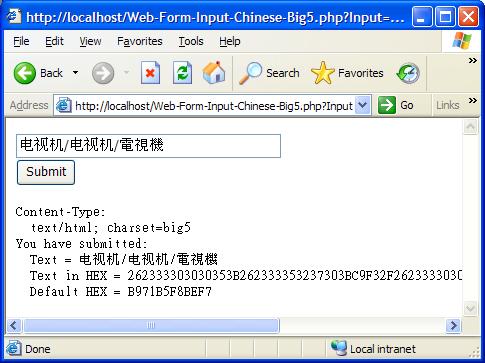
The returning page URL also confirmed that Chinese characters were copied and pasted correctly. Notice that Big5 contains simplified Chinese characters. One of the simplified character has a special encoding: 0x262333303030353B, , corresponding to %26%2330005%3B:
http://localhost/Web-Form-Input-Chinese-Big5.php
  ?Input=%26%2330005%3B%26%2335270%3B%C9%F3
  %2F%26%2330005%3B%26%2335270%3B%C9%F3
  %2F%B9q%B5%F8%BE%F7&Submit=Submit
As a reference, here is the Chinese text in Hex numbers received by the PHP script:
262333303030353B262333353237303BC9F3
2F262333303030353B262333353237303BC9F3
2FB971B5F8BEF7
This test shows that IE is smart, it automatically converts the pasted Chinese characters from UTF-8 and GB18030 encoding to Big5 encoding in a Web page form encoded as Big5.
Table of Contents
PHP Installation on Windows Systems
Integrating PHP with Apache Web Server
charset="*" - Encodings on Chinese Web Pages
Chinese Characters in PHP String Literals
Multibyte String Functions in UTF-8 Encoding
Input Text Data from Web Forms
►Input Chinese Text Data from Web Forms
Processing Chinese Input on Web Forms in UTF-8
Processing Chinese Input on Web Forms in GB18030
Processing Chinese Input on Web Forms in Big5
Copying and Pasting Chinese Input to UTF-8 Web Forms
Copying and Pasting Chinese Input to GB18030 Web Forms
►Copying and Pasting Chinese Input to Big5 Web Forms
MySQL - Installation on Windows
MySQL - Connecting PHP to Database
MySQL - Character Set and Encoding
MySQL - Sending Non-ASCII Text to MySQL
Retrieving Chinese Text from Database to Web Pages
Input Chinese Text Data to MySQL Database