Chinese Web Sites Using PHP - v2.24, by Herong Yang
Chinese Character String with UTF-8 Encoding
This section providing information on handling Chinese character string literals in UTF-8 encoding.
Since PHP strings are sequences of 8-bit characters, we can use them as binary strings to store Chinese character strings in UTF-8 encoding. In order to output Chinese characters to Web pages and display them correctly, you need to:
- Enter Chinese characters in string literals in PHP scripts in UTF-8 encoding.
- Handle Chinese character strings with normal string functions.
- Output Chinese character strings to Web pages with the echo() or print() function.
- Set charset=utf-8 in the HTML document header.
- Make sure that PHP script files are saved in UTF-8 encoding.
Here is a simple test I did on my local system:
1. Click Start > All Programs > Accessories > Notepad.
2. In Notepad, enter the following PHP script:
<?php
#- String-UTF-8.php
#- Copyright (c) 2005 HerongYang.com. All Rights Reserved.
#
  $help_simplified = '这是一份非常简单的说明书…';
  $help_tradition = '這是一份非常簡單的說明書…';
  print('<html>');
  print('<meta http-equiv="Content-Type"'.
    ' content="text/html; charset=utf-8"/>');
  print('<body>');
  print('<b>Chinese string in UTF-8 in PHP</b><br/>');
  print($help_simplified.'<br/>');
  print($help_tradition.'<br/>');
  print('</body>');
  print('</html>');
?>
Note that I used some Chinese character input add-on tools to enter Chinese characters.
3. Select menu File > Save as. Enter the file name as String-UTF-8.php. Select "UTF-8" in the Encoding field and click the Save button.
4. Copy String-UTF-8.php to \local\apache\htdocs.
5. Now run Internet Explorer (IE) with http://localhost/String-UTF-8.php. You should see Chinese characters displayed correctly:
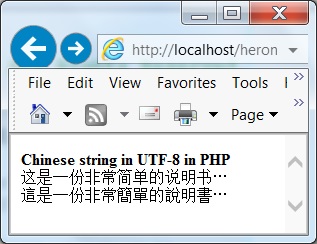
This proves that the editor: notepad, the CGI program: PHP CGI, the Web server: Apache, and the Web browser: IE, all worked correctly with Chinese characters in UTF-8 encoding.
Table of Contents
PHP Installation on Windows Systems
Integrating PHP with Apache Web Server
charset="*" - Encodings on Chinese Web Pages
►Chinese Characters in PHP String Literals
String Data Type, Literals and Functions
►Chinese Character String with UTF-8 Encoding
Chinese Character String with GB18030 Encoding Error
Chinese Character String with GB18030 Encoding
Chinese Character String with Big5 Encoding
UTF-8 Encoding Pages with Big5 Characters
Multibyte String Functions in UTF-8 Encoding
Input Text Data from Web Forms
Input Chinese Text Data from Web Forms
MySQL - Installation on Windows
MySQL - Connecting PHP to Database
MySQL - Character Set and Encoding
MySQL - Sending Non-ASCII Text to MySQL
Retrieving Chinese Text from Database to Web Pages
Input Chinese Text Data to MySQL Database