Chinese Web Sites Using PHP - v2.23, by Herong Yang
Inputting Chinese Text to MySQL Database in GBK
This section describes how to take Chinese text from Web form and store it in MySQL database in GBK encoding.
MySQL 5 does not support GB18030 encoding. So my second test uses GBK encoding. I need to remember three important settings:
- I need to set Content-Type = "text/html; charset=gbk" for the HTTP response header and the Web page HTML document. This is to tell the Web browser that display page content in GBK encoding and take form input text in GBK encoding.
- On the MySQL side, I need to set two session control variables: character_set_client=gbk and character_set_connection=gbk when saving input text to the database table. This is to tell MySQL server that my SQL statement is encoded as GBK and keep it as GBK when executing the statement.
- When retrieving text data from MySQL, I need to set one session control variable: character_set_results=gbk. This is to tell MySQL server that result set must be sent back in GBK encoding.
Here is my PHP script for the test Web page:
<?php
#- MySQL-Input-Chinese-GBK.php
#- Copyright (c) 2005 HerongYang.com. All Rights Reserved.
#
  header('Content-Type: text/html; charset=gbk');
  print('<html><head>');
  print('<meta http-equiv="Content-Type"'.
    ' content="text/html; charset=gbk"/>');
  print('</head><body>'."\n");

# Default input text
  $input = '???';
  $input_hex = 'B5E7CAD3BBFA';

# Form submit detection
  $submit = isset($_REQUEST["Submit"]);

# Process form input data
  if ($submit) {
    if (isset($_REQUEST["Input"])) {
      $input = $_REQUEST["Input"];
    }
    $con = mysqli_connect("localhost", "Herong", "TopSecret");
    $ok = mysqli_select_db($con, "HerongDB");
    $test_name = "Input Chinese GBK";

#   Set character_set_client and character_set_connection
    mysqli_query($con, "SET character_set_client=gbk");
    mysqli_query($con, "SET character_set_connection=gbk");

#   Delete the record
    $sql = "DELETE FROM Comment_Mixed WHERE Test_Name ='$test_name'";
    mysqli_query($con, $sql);

#   Build the SQL INSERT statement
    $sql = <<<END_OF_MESSAGE
INSERT INTO Comment_Mixed (Test_name, String_ASCII,
    String_Latin1, String_UTF8, String_GBK, String_Big5)
  VALUES ('$test_name', null, null, null, '$input', null);
END_OF_MESSAGE;

#   Run the SQL statement
    mysqli_query($con, $sql);

    mysqli_close($con);
  }

# Display form
  print('<form>');
  print('<input type="Text" size="40" maxlength="64"'
   . ' name="Input" value="'.$input.'"/><br/>');
  print('<input type="Submit" name="Submit" value="Submit"/>');
  print('</form>'."\n");

# Generate response
  if ($submit) {
    $con = mysqli_connect("localhost", "Herong", "TopSecret");
    $ok = mysqli_select_db($con, "HerongDB");

#   Set character_set_results
    mysqli_query($con, "SET character_set_results=gbk");

    $sql = "SELECT * FROM Comment_Mixed"
      . " WHERE Test_Name = '$test_name'";
    $res = mysqli_query($con, $sql);
    $output = 'SELECT failed.';
    if ($row = mysqli_fetch_array($res)) {
      $output = $row['String_GBK'];
    }
    mysqli_free_result($res);

    print('<pre>'."\n");
    print('Content-Type:'."\n");
    print('  text/html; charset=gbk'."\n");
    print('You have submitted:'."\n");
    print('  Text = '.$input."\n");
    print('  Text in HEX = '.strtoupper(bin2hex($input))."\n");
    print('  Default HEX = '.$input_hex."\n");
    print('Saved and retrieved from database:'."\n");
    print('  Text = '.$output."\n");
    print('  Text in HEX = '.strtoupper(bin2hex($output))."\n");
    print('</pre>'."\n");

    mysqli_close($con);
  }

  print('</body></html>');
?>
After moving this PHP script file to Apache server document directory, I tested it with Internet Explorer (IE) with this URL: http://localhost/MySQL-Input-Chinese-GBK.php. I saw a Web page with a form that has the suggested input text and a submit button.
The default input Chinese characters were displayed correctly.
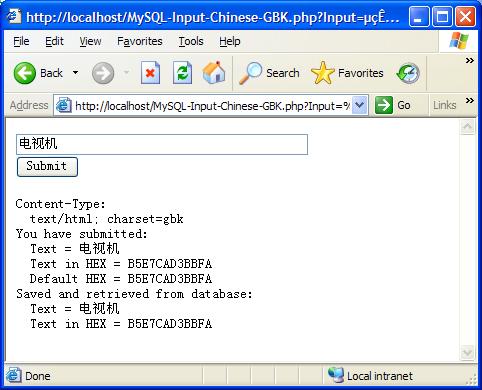
After clicking the submit button, I saw a returning Web page with the same form and a reply section. The Chinese input characters were received by PHP correctly. They were stored in MySQL database and retrieved back correctly:
This tutorial works on many combinations of PHP/MySQL, including PHP 5/MySQL 5, and PHP 7/MySQL 8.
Conclusion: Chinese text can be entered on Web forms, received by PHP scripts, stored in MySQL database, and retrieved back to Web pages correctly in GBK encoding. The GBK character is smaller than GB18030, but bigger than GB2312.
Table of Contents
PHP Installation on Windows Systems
Integrating PHP with Apache Web Server
charset="*" - Encodings on Chinese Web Pages
Chinese Characters in PHP String Literals
Multibyte String Functions in UTF-8 Encoding
Input Text Data from Web Forms
Input Chinese Text Data from Web Forms
MySQL - Installation on Windows
MySQL - Connecting PHP to Database
MySQL - Character Set and Encoding
MySQL - Sending Non-ASCII Text to MySQL
Retrieving Chinese Text from Database to Web Pages
►Input Chinese Text Data to MySQL Database
Steps and Application Components Involved
Inputting Chinese Text to MySQL Database in UTF-8
►Inputting Chinese Text to MySQL Database in GBK
Inputting Chinese Text to MySQL Database in Big5